Chapter 6 · Tour · 12 min read
On this page20
The ecosystem
Claude Code alone is a good agent. With the ecosystem, it becomes a platform you extend instead of wait for.
This chapter is a tour with enough steps to try each piece yourself. Skim it, pick one thing, come back later for depth.
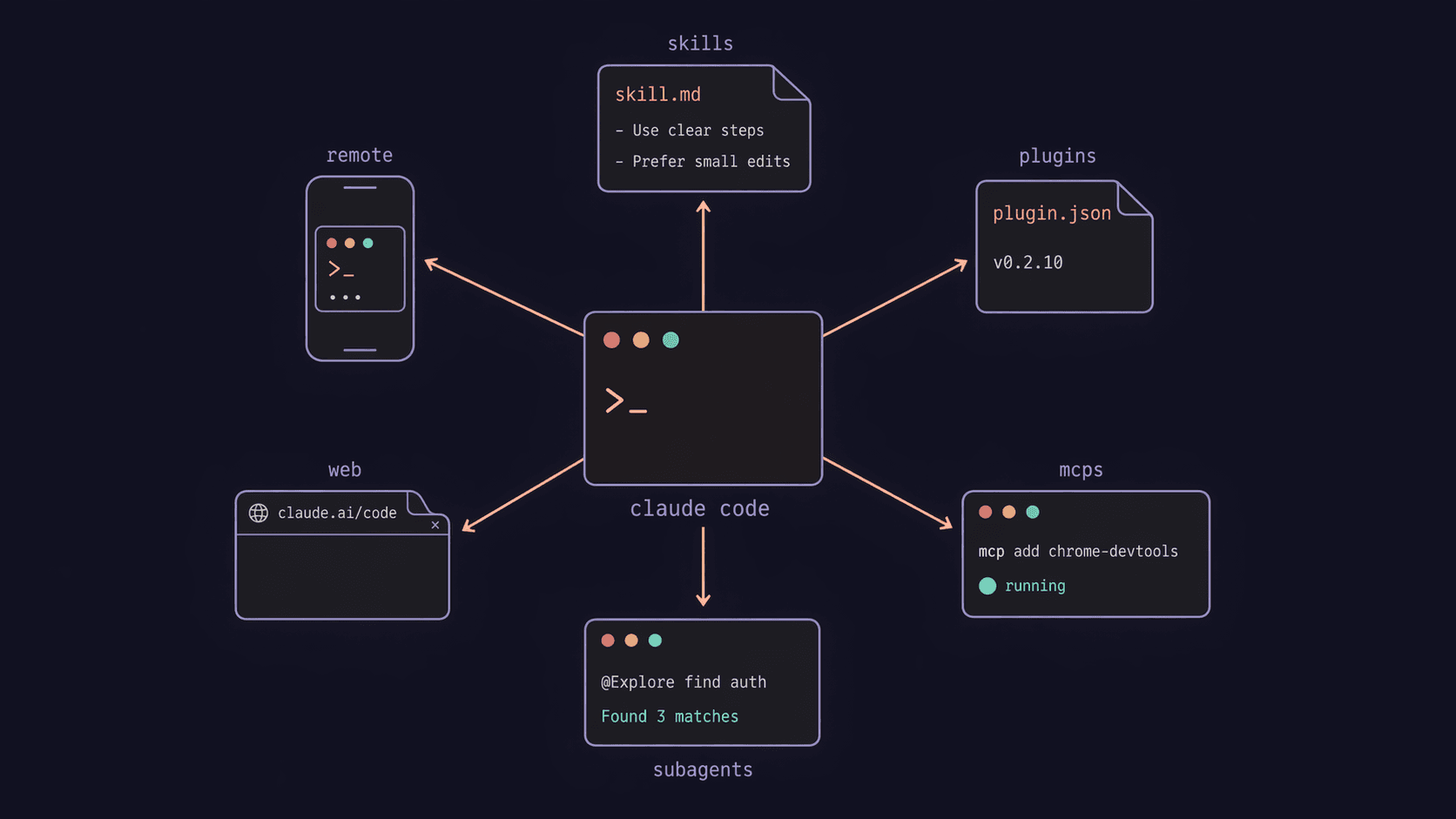
Everything we're about to cover — skills, plugins, MCPs, subagents — runs inside sessions. The app keeps several open at once, so one conversation can be mid-refactor while another is still planning.
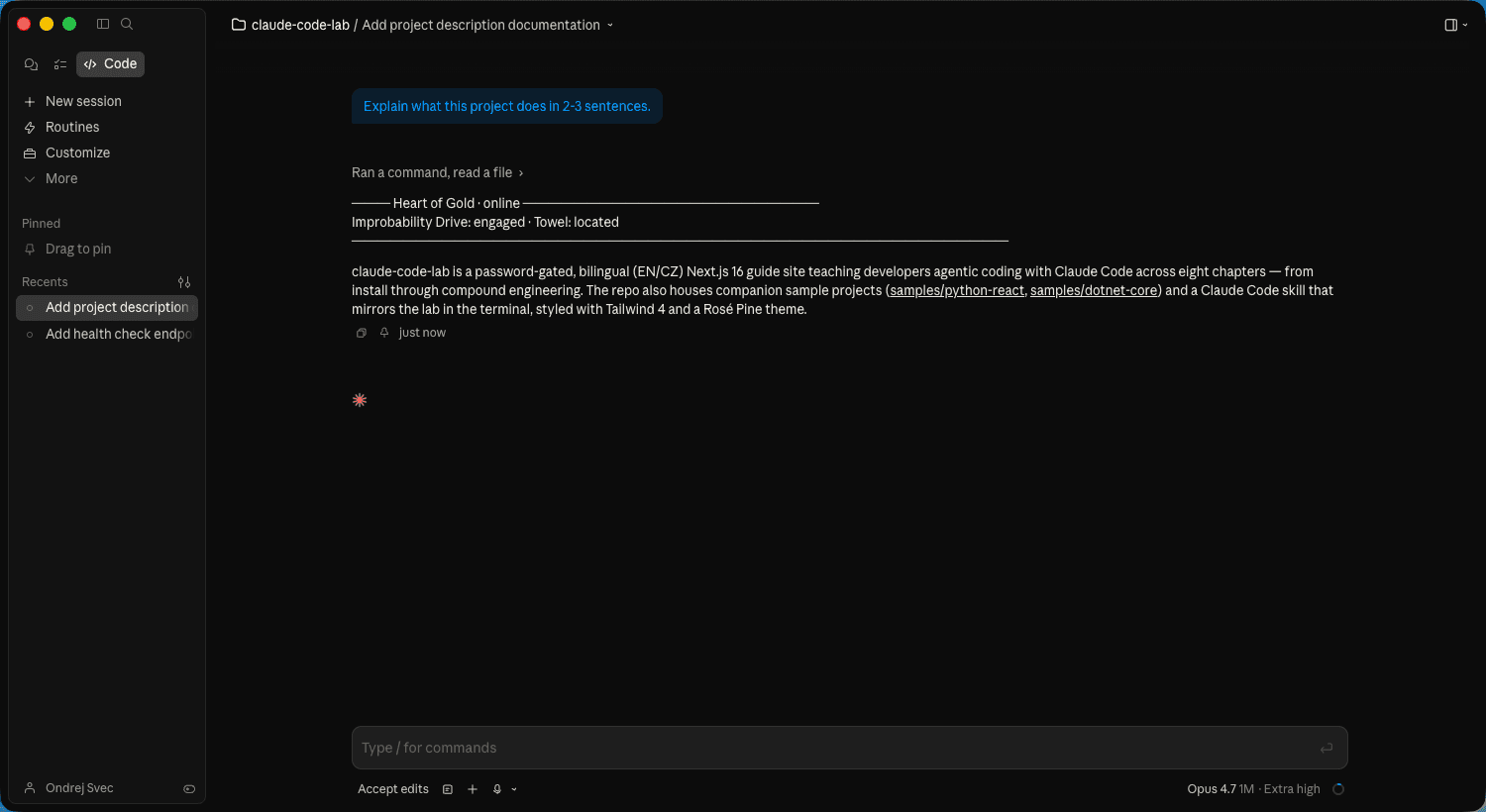
Once sessions spread across repos and machines, claude agents is the one-stop list: running, blocked on you, done. Add --json and the output is machine-readable: every live session as a JSON array, ready for tmux-resurrect, status bars, session pickers, or any script that needs to know what's running. Blocked sessions now include a waitingFor field — shows what the session is stuck on (e.g. a pending permission prompt). On a monorepo, claude agents --cwd <path> scopes the list to sessions rooted at that directory. Dispatch flags let you configure a background session before it starts: --model, --effort, --permission-mode, --settings, --mcp-config, --plugin-dir, --add-dir, and --dangerously-skip-permissions. Set the model, the effort level, the permission posture, the MCPs it can reach — then walk away.
New flags now extend what you can configure from the dashboard. --add-dir, --settings, --mcp-config, and --plugin-dir apply to the dashboard itself and to background sessions it dispatches. --permission-mode, --model, --effort, and --dangerously-skip-permissions set defaults for sessions dispatched from the view.
claude agents accepts --permission-mode, --model, --effort, --settings, --mcp-config, --plugin-dir, --add-dir, and --dangerously-skip-permissions to configure every background session dispatched from the view. Your tools and permission posture travel with the worker, not the shell you launched from.
Pin a session with Ctrl+T inside the claude agents view — pinned sessions stay alive when idle, restart automatically when Claude Code updates, and are only shed under memory pressure after non-pinned sessions. Type ! <command> to run a shell command as a background session you can attach to and detach from; claude --bg --exec '<command>' does the same from the terminal.
Inside the agents view, ! <command> starts a shell command as a new background session — one you can attach to and detach from on your schedule. Same move from the terminal: claude --bg --exec '<command>'.
Background sessions now protect their own work. They commit and push automatically to preserve progress, open a draft PR only when the task actually calls for one, and follow whatever git conventions your CLAUDE.md sets. Every run ends by reporting exactly where the work landed.
Sessions can now talk to each other, across machines. SendMessage reaches another Claude Code session by name — on macOS and Linux, that includes sessions running on a different machine, not just ones in the same claude agents list. ListAgents marks a cross-machine session as name [ref] so you don't confuse it with a same-named local one. A session can now open the conversation itself instead of only replying once someone messages it first. Two new settings, crossSessionInbound and dialogExpiry, shape how much a bypassed-permissions session trusts what comes in: messages sent to it are held for your approval, while messages to sessions on normal permissions still auto-deliver.
Skills
A skill is a bundle of instructions + optional scripts that Claude loads on demand. A domain-specific playbook — lives in ~/.claude/skills/, activates automatically when the situation matches.
An example worth a look: visualize ↗. Takes any markdown document — a plan, a brainstorm, an architecture doc — and turns it into a polished, shareable HTML artifact. One well-defined job, well-scoped instructions, a few helper scripts. The shape of a good skill.
Open standard. Skills follow the Agent Skills open format ↗ — spec is public, skills are portable across Claude Code and other tools that adopt the standard. Anthropic maintains a reference repo ↗ with 17 production skills you can read as exemplars.
Another one worth trying: /dataviz — chart and dashboard design guidance with a runnable color-palette validator, for the next time you build a chart or dashboard with Claude.
Chapter 7 shows how to have Claude build one of these for you.
Trim what Claude sees with skillOverrides. Set a skill to off and it vanishes from both the model and / autocomplete. user-invocable-only keeps the slash command but hides it from the model. name-only collapses the description to just the name — useful when a large collection starts generating noise.
Set disableBundledSkills: true in settings.json (or CLAUDE_CODE_DISABLE_BUNDLED_SKILLS=1) to hide all bundled skills, built-in workflows, and default slash commands from the model entirely — only what you've installed remains visible.
Nested skill directories. Skills inside nested .claude/skills/ subdirectories load automatically when Claude works on files in that directory — no extra setup. On a name collision, the nested skill surfaces as <dir>:<name> so both versions stay available. Useful for monorepos where different packages need separate skill sets.
context: fork skills go to the background. Skills declaring context: fork now run there by default. Opt a specific skill back into blocking with background: false in its frontmatter.
Plugins
A plugin bundles related skills, commands, and hooks into one installable unit. Install once, get the whole workflow. The Discover and Browse screens now show a plugin's commands, agents, skills, hooks, and MCP/LSP servers — inspect before you install. Simplest form: a root-level SKILL.md with no skills/ subdirectory — it surfaces as a skill automatically without extra wiring.
Chapter 7 walks through installing and using the Compound Engineering plugin ↗ — Avery's full brainstorm → plan → work → review → compound loop. That's the one to try first. Super Powers ↗ is another worth knowing about — a broader pick-and-choose toolkit.
As a reference point: the Heart of Gold toolkit ↗ is a small collection of skills I bundled for my daily work (visualize is one of them). Not something to install now — an example of what emerges once you've written three or four skills you don't want to lose. You'll build one of your own.
Need a plugin for one session without installing it? Pass --plugin-url <url> to claude and it loads the .zip archive from that URL for the current session only.
Installing from a zip is now a permanent plugin source too, not just a one-session flag. The archive source installs a plugin straight from a .zip over HTTPS — no git, no npm — with optional SHA-256 pinning for supply-chain trust.
Plugin dependencies are now enforced. claude plugin disable refuses if another enabled plugin depends on the target, and prints the chain you need to disable first. claude plugin enable goes the other direction: it force-enables any transitive dependencies automatically.
Plugin auto-rename is now automatic: when a marketplace entry is renamed, Claude Code follows the renames map and updates your settings.json to the new name on next load — you don't have to track renames manually.
Plugins in .claude/skills/ directories auto-load — no marketplace registration needed. Scaffold one with claude plugin init <name>, which writes the plugin skeleton into .claude/skills/<name>/.
One official Anthropic plugin worth adding early: security-guidance. It reviews code changes for vulnerabilities in the same session — fast pattern check on each edit, model review at each turn end, deeper agentic review on commit or push. Install from the official marketplace — plugins now activate immediately when it's safe to, instead of always requiring a reload:
/plugin install security-guidance@claude-plugins-official
Didn't pick up right away? /reload-plugins is still there as a fallback.
Add project-specific rules in .claude/claude-security-guidance.md.
Build your first skill — the agentic way
Before you install more of other people's, write one of your own. When something repeats — the shape of the prompt, the format of the output, the sequence of steps — extract a skill. And don't hand-write SKILL.md. Have Claude do it.
Two meta-skills that write skills
Both do the same job: guide you through discovery, draft a well-shaped SKILL.md, write it to disk. Pick one.
skill-creator— shipped by Anthropic in theanthropics/skills↗ repo. Install via/pluginfrom that marketplace. Canonical, minimal, teaches the shape.craft-skill— part of the Heart of Gold toolkit ↗. Opinionated, five-phase workflow with a technique checklist, higher-conformance output by default.
The walkthrough
With either installed, in a real project, run:
/skill-creator
(or /craft-skill, depending on which you installed).
Claude asks, one question at a time:
- What should this skill do? One sentence. "Turn a markdown brainstorm into a shareable HTML visual artifact."
- When should it activate? Trigger phrases. "visualize, mindmap, show me the structure, make this visual."
- Who's the user? Specific. "Me, when I've finished a brainstorm and want to share the shape with someone."
- What does success look like? The output shape. "A single HTML file, dashboard-style layout, that I can copy to share."
Answer each as specifically as you can. Vague answers make vague skills.
Claude then drafts the SKILL.md — name, a description with those triggers in it, bounded tool allowlist, mission, boundaries, decision rules, examples. Shows you the diff. You review, tweak, accept.
The file lands in ~/.claude/skills/my-skill/SKILL.md. Next session, when you say one of the trigger phrases, the skill activates automatically.
Progressive disclosure
Skills stay under ~500 lines. Longer content goes into bundled files: references/ for reading material, scripts/ for helpers, assets/ for templates. This is called progressive disclosure — the metadata is always loaded, the body loads when triggered, the extras load only if needed.
A mature skill like visualize in the Heart of Gold toolkit ↗ shows what that looks like at scale — one SKILL.md, half a dozen helper scripts beside it, decision trees for when each script applies. None of it was hand-written cold; each piece got added when a week of use revealed a gap.
Agent Skills open format
The format is an open spec ↗ — frontmatter fields, loader behaviour, progressive-disclosure rules. Anthropic's full reference is in anthropics/skills/spec/agent-skills-spec.md ↗. Skills you write work in Claude Code today and will work in any tool that adopts the spec tomorrow.
The endgame
Do this three or four times — extract a skill whenever something repeats — and suddenly you have a small collection. Bundle them with a .claude-plugin/plugin.json, publish to GitHub, and that's your plugin. Same shape as the Compound Engineering plugin you installed earlier, just yours. Your team installs once and inherits everything you've learned to systematise.
Shortcut for single-skill plugins: if your plugin has a SKILL.md at the root and no skills/ subdirectory, Claude surfaces it as a skill automatically — no extra folder structure required.
That's compound, all the way down.
→ Skills docs ↗ · Plugins docs ↗
MCPs — Claude's hands on external services
Model Context Protocol is the open standard for wiring Claude to tools that live outside its conversation — filesystems, databases, browsers, APIs. If skills extend what Claude knows, MCPs extend what Claude can do.
Try one: Chrome DevTools MCP
The standout for web work. Gives Claude live access to Chrome — console logs, network requests, Lighthouse, performance traces, screenshots.
claude mcp add --transport stdio chrome-devtools -- npx -y chrome-devtools-mcp@latest
Then in your session:
Open https://example.com ↗ and tell me why its LCP is slow. Run Lighthouse if you need to.
Claude opens the page, inspects, reports back. This is the moment MCPs stop being abstract.
Others worth knowing about
- Gmail, Google Drive, Calendar, Notion — bundled on
claude.aifor plan users - Postgres, Linear, Sentry, GitHub, Playwright — community MCPs, one
claude mcp addaway - Build your own —
mcp-builderskill inanthropics/skillsscaffolds one
Security note. MCPs that fetch untrusted content (web pages, issues, emails) can inject instructions into your session. Anthropic's warning stands: third-party MCPs at your own risk. Chapter 9.5 has more.
alwaysLoad. By default, Claude may defer loading some tools from an MCP server until they're explicitly requested. Set alwaysLoad: true in a server's config entry and every tool from that server is available from session start — no deferral, no search step. Useful for servers whose tools you reach for in nearly every session.
Portable paths. MCP stdio servers now receive CLAUDE_PROJECT_DIR in their environment — the same variable hooks already use. Plugin configs can reference ${CLAUDE_PROJECT_DIR} in commands. Write the path binding once; both hooks and MCPs resolve the project root the same way.
Checking connections. /mcp shows the tool count for each connected server and flags any server that connected with 0 tools — zero tools means the server connected but nothing loaded. When a server fails to connect, /mcp and claude mcp list now show the HTTP status and error text. Both also warn if a config value has hidden leading or trailing whitespace.
Startup auth notice. When an MCP server needs authentication, Claude shows a notice at session startup pointing at /mcp — auth gaps surface before you're mid-task.
CLI authentication. claude mcp login <name> and claude mcp logout <name> authenticate MCP servers without opening the interactive /mcp menu. Add --no-browser to redirect the auth flow over stdin — useful when connecting over SSH.
Tool timeout. MCP tool calls that hang with no response now abort after 5 minutes instead of blocking indefinitely. Override with CLAUDE_CODE_MCP_TOOL_IDLE_TIMEOUT.
→ MCP quickstart ↗ · MCP docs ↗
Subagents — delegate to keep your context clean
A subagent is a specialised worker Claude spawns with its own context window, tools, and permissions. When Claude needs to do something heavy — explore a big codebase, run a review, summarise a long file — it can delegate to a subagent instead of burning your main context.
You can invoke them directly, or let Claude choose.
Try one: the built-in Explore agent
Ship-built. Read-only, fast (Haiku), ideal for "where is X?" questions in a large codebase.
In any repo, ask:
Use the Explore agent to find where authentication is handled, then summarise.
Or more explicitly, mention it by name:
@Explore: find every place we call the Stripe API.
Your main conversation gets a two-paragraph summary. The actual file-reading happened in a side context that's now discarded. You spent ~100 tokens on the result, not ~20k on the exploration.
Create your own
For recurring delegation — say, a reviewer that always applies your team's standards — run:
/agents
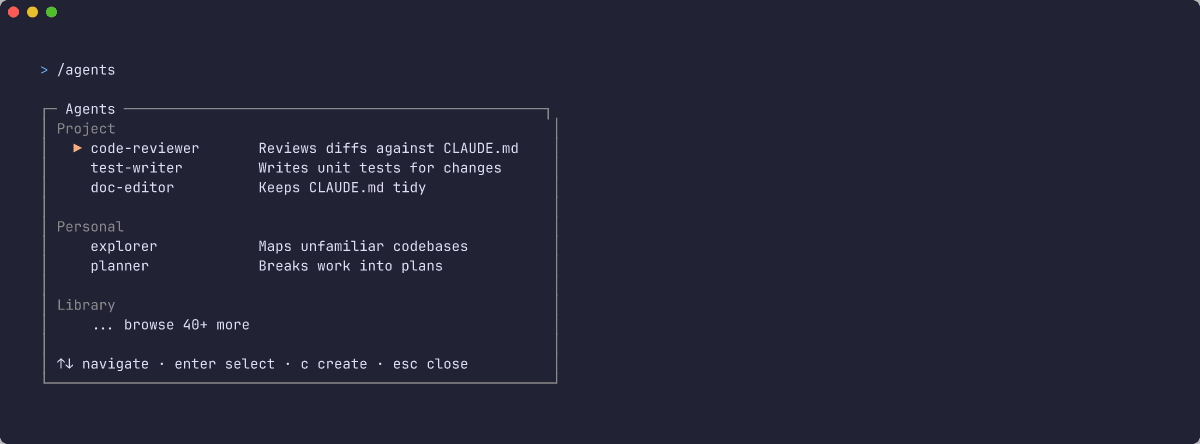
Choose Library → Create new agent → let Claude generate the definition. Scope it (Personal or Project), restrict its tools, save. Your agent is now .claude/agents/my-agent.md and available via @my-agent or natural language.
Note. In Claude Code v2.1.63+, the internal Task tool was renamed to Agent. Older tutorials calling it Task still work — same thing.
Background by default. Subagents now run in the background by default — Claude keeps working while they run and gets notified when they finish, instead of blocking on each one.
Nesting. Subagents can spawn nested subagents up to depth 3 by default — set CLAUDE_CODE_MAX_SUBAGENT_SPAWN_DEPTH=1 if you want the older, flatter behavior back.
Remote and mobile — Claude off your desk
Two different products people confuse. Both need a Pro plan or higher — API-key-only setups are locked out.
Remote Control — your workstation, your files
Claude Code runs on your machine, with full local filesystem access, your configured MCPs, your keys. You drive it from a browser or mobile app.
Setup — four steps:
- Confirm version:
claude --version(needs 2.1.51+) claude→/loginto sign in through claude.ai- In your project:
claude --remote-control "My Project" - Press
spacebarat the terminal → QR code. Scan with the Claude mobile app (iOS ↗, Android ↗) or openclaude.ai/codein a browser.
You can now drive the session from anywhere. Long-running builds, PR reviews from a meeting, "check the deploy" from your phone.
Claude Code on the Web — cloud-hosted, ephemeral
Different product. Session runs on Anthropic-managed VMs, starting from a fresh clone of your GitHub repo. No local files, no local MCPs. Good for quick GitHub-based tasks from any device.
Start via claude.ai/code on the web — pick a repo, start a session.
Self-hosted environments — your infrastructure, Team and Enterprise
A third option, for orgs that need it. claude self-hosted-runner turns your own machines or containers into a place Claude Code web, mobile, and desktop sessions can run. Available on Team and Enterprise plans.
Mobile app
Not a standalone Claude Code — a controller for Remote Control sessions and Claude Code on the Web. Push notifications for permission prompts. Review diffs, chat, approve tool calls from your phone. Starts web sessions on its own.
→ Remote Control docs ↗ · Claude Code on the Web ↗
Practice: continue your sample
Working through the lab in order? Take what this chapter taught to the sample you started in chapter 2 — or to a codebase of your own, where it'll land harder.
- Install one of the meta-skills from this chapter:
/plugin install skill-creatorfromanthropics/skills, or the Heart of Gold toolkit for/craft-skill. Pick one. - Run it and let it walk you through authoring a skill called
scaffold-endpoint. Purpose: add a newGET /<name>route matching your project's framework conventions — minimal-APIMapGetin Varianta A,@app.getin Varianta B, or whatever your own repo uses. Trigger phrases:scaffold endpoint,add a new route. - Once saved, trigger the skill in your project — ask it to add
GET /pingreturning{ "pong": true }. Review the output. If the scaffolding is off, edit the skill, not the output. That's the feedback loop.
When it works: you have a reusable skill you didn't hand-write, living in ~/.claude/skills/ or your project's .claude/skills/. The next chapter's practice runs the full Compound Engineering loop on one real feature.
The ecosystem is a menu, not a checklist. Install what actually saves you time. Everything else can wait.
Go deeper
Library entries that build on this chapter.