Chapter 9 · Bookmark this · Lookup page
On this page37
Reference
Bookmark this chapter. It's the lookup page — not a tutorial. When you've forgotten a shortcut mid-flow, scroll here, grab it, move on.
8.1 Slash commands
Type / in any Claude Code conversation to see the full list filtered to your plan, platform, and installed plugins. These are the built-ins worth knowing.
Session
| Command | What it does |
|---|---|
/clear | Start a new conversation. Previous one still archived — resume with /resume. |
/cd | Move the session to a new working directory without breaking the prompt cache mid-session. |
/compact [focus] | Keep the conversation, summarise history, free context. Optional focus narrows what to keep. |
/resume | Pick up a previous conversation. Background sessions (started with --bg) now appear here too, marked with bg. |
/rewind | Checkpoint menu — restore code, conversation, or both to an earlier state, including before a /clear. Same as double-Esc. |
/branch | Fork the conversation from a given point. |
/fork | Copy the conversation into a new background session — its own row in claude agents, in its own git worktree — while you keep working in this one. |
/subtask | Launch the in-session subagent /fork used to spawn. |
/exit | Quit Claude Code (or Ctrl+D). |
Configuration
| Command | What it does |
|---|---|
/init | Scan the repo and propose a starting CLAUDE.md. Set CLAUDE_CODE_NEW_INIT=1 for the new multi-phase interactive flow. |
/memory | View or edit CLAUDE.md files and loaded memory. |
/permissions | Manage tool allow/deny rules. |
/model | Switch model for the current session (e.g., Opus → Sonnet). Sonnet 5 is now the default model — native 1M-token context window, promotional pricing of $2/$10 per Mtok through August 31. Requires v2.1.197+. Selecting a model now saves it as the default for new sessions. Press s in the picker to switch for the current session only. Set fallbackModel in settings.json to chain up to three fallback models tried in order when the primary is overloaded or unavailable. --fallback-model also applies to interactive sessions. Within the Opus family, Opus 5 (claude-opus-5) is now the default model — 1M context, fast mode priced at $10/$50 per Mtok. |
/fast | Toggle fast mode. Default is now Opus 4.8 — 2× the standard rate for 2.5× the speed. Opus 4.7 is no longer eligible; /fast now applies to Opus 5 and Opus 4.8. |
/effort | Per-session effort override. |
/advisor [model] | Pair the session with an advisor — a stronger model Claude calls at decision points (before committing to an approach, when stuck on a recurring error, before declaring done). Shorthand: opus, sonnet, fable. Requires v2.1.98+. Fable 5 as advisor requires v2.1.170+. /advisor off to clear. |
/keybindings | Open ~/.claude/keybindings.json. |
/hooks | Configure lifecycle hooks. |
/config | Open the settings UI. /config key=value sets any setting from the prompt — e.g. /config thinking=false. /config --help lists all shorthand keys. |
/theme | Switch terminal theme. |
Session language. Set the language setting in settings.json to pin the language used for session-title generation. Default auto-detects from your conversation.
Info
| Command | What it does |
|---|---|
/help | List commands. |
/powerup | Interactive onboarding — ten animated walkthroughs of features most people miss. |
/context | Visualise current context-window usage with optimisation hints. |
/cost | Session cost so far. |
/usage, /stats | Usage metrics. /usage breaks down by category — skills, subagents, plugins, per-MCP-server cost. |
/doctor | Diagnostics — surfaces config conflicts, missing setup. |
Workflow
| Command | What it does |
|---|---|
/agents | The interactive wizard was removed — ask Claude to create or manage subagents, or edit .claude/agents/ directly. |
/tasks | Manage backgrounded tasks — kick off a long-running operation, pick up the result later. |
/workflows | View your dynamic workflow runs. |
/plugin | Install or manage plugins. /plugin list lists installed plugins; --enabled/--disabled filters. |
/mcp | Install or manage MCP servers. |
/skills | List installed skills. |
/reload-skills | Re-scan skill directories without restarting the session. |
/review | Alias of /code-review. |
/code-review [level] [pr#] | Correctness review at a chosen effort level (e.g. /code-review high), against the current diff or a specific PR (/code-review <level> <pr#>). With no level given, reuses the level you last typed — type one explicitly to change it. Pass ultra for a deep cloud review. Pass --comment to post findings as inline GitHub PR comments. Pass --fix to apply findings to the working tree. Claude no longer runs /verify or /code-review on its own — invoke them explicitly when you want them. /simplify runs a cleanup-only pass — reuse, simplification, efficiency, altitude — not the full bug-hunting review. /code-review now runs as a background subagent — review no longer fills your conversation, and stacked slash commands are its review target. |
/security-review | Bundled security review skill. |
/diff | Show diff since last checkpoint. Scroll the detail view with arrows, j/k, PgUp/PgDn, Space, Home/End. |
Dynamic workflow runs trigger on explicit phrases like workflow: or run a workflow — not on any mention of the word. The keyword highlights with a purple shimmer in the input line.
Remote
| Command | What it does |
|---|---|
/remote-control (alias /rc) | Make the current session drivable from phone or browser. |
/mobile | QR code to open the session in Claude mobile app. |
/teleport (alias /tp) | Pull a Claude-Code-on-Web session into your terminal. |
/web-setup | Set up Claude Code on the Web for the current repo. |
Heart of Gold toolkit (if installed)
| Command | What it does |
|---|---|
/loop <interval> <task> | Run <task> every interval. |
/schedule | Create or manage cron-scheduled remote agents. |
/learn | Capture session insights to memory. |
/handoff | Prepare a handoff doc for the next session or teammate. |
/compound | Document a solved problem for future reference. |
Project management
Invoked in your terminal as claude <subcommand>, not inside a session.
| Command | What it does |
|---|---|
claude project purge [path] | Delete all Claude Code state for a project: transcripts, tasks, file history, config entry. Supports --dry-run, -y/--yes, -i/--interactive, --all. |
8.2 Keyboard shortcuts
CLI shortcuts are context-specific. Full list at code.claude.com/docs/en/keybindings ↗. Edit your own at ~/.claude/keybindings.json via /keybindings.
Must-know
| Shortcut | Action |
|---|---|
Esc Esc | Rewind — restore to a previous message (same as /rewind). |
Ctrl+C | Interrupt current input or response. Does not exit. Reserved. |
Ctrl+D | Exit Claude Code. Reserved. |
Shift+Tab | Cycle permission mode: manual (formerly default) → acceptEdits → plan → auto. |
Ctrl+R | Reverse-search history — searches all projects by default. Ctrl+S to narrow to the current project or session. |
Ctrl+O | Toggle verbose transcript (expands collapsed tool calls). |
Ctrl+T | Toggle task list. |
Ctrl+B | Background the current task. (Conflicts with tmux prefix — press twice.) |
Ctrl+J | Newline without submitting. |
Ctrl+G or Ctrl+X Ctrl+E | Open current prompt in $EDITOR. |
Ctrl+V (Cmd+V on iTerm2) | Paste image from clipboard as [Image #N]. |
Cmd+P / Meta+P | Model picker. |
Cmd+T / Meta+T | Toggle extended thinking. |
Shift+Enter or \+Enter | Multi-line entry. Native in iTerm2, WezTerm, Ghostty, Kitty, Warp, Apple Terminal. Elsewhere: /terminal-setup. |
Gotcha
Option-key shortcuts on macOS silently fail until you set Left/Right Option = Esc+ in your terminal profile (iTerm2, etc.). If Alt+M does nothing for mode cycling, that's why — use Shift+Tab instead.
The desktop app's shortcuts are not officially documented by Anthropic — what you see here is the CLI.
8.3 Input prefixes
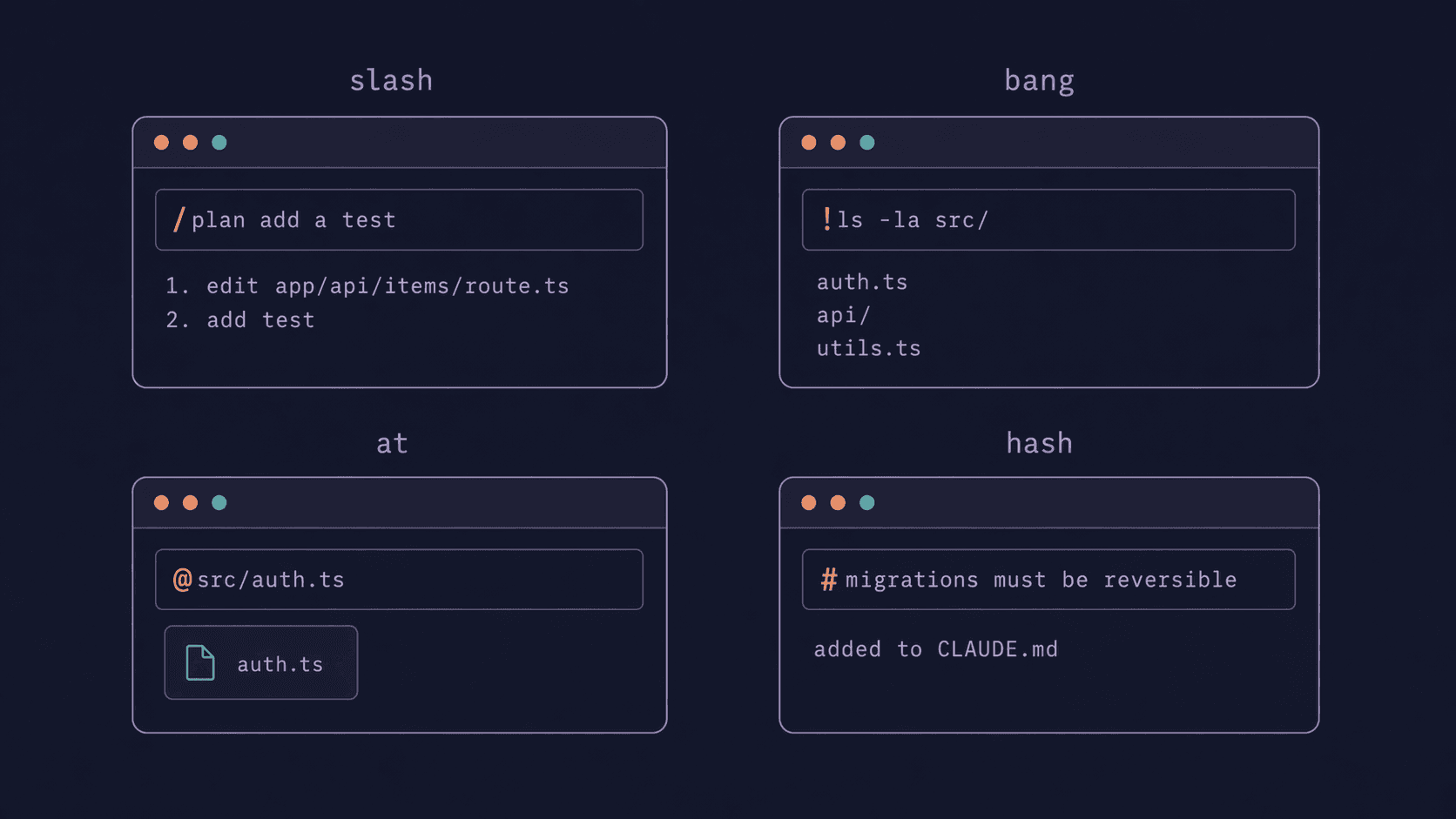
Claude Code's input line reads the first character as a mode signal:
| First char | Mode |
|---|---|
/ | Slash command — runs a command, not a prompt. |
! | Bash passthrough — runs shell, result enters your context; ! commands now trigger Claude to respond to the output automatically. Set "respondToBashCommands": false in settings.json to keep the previous context-only behavior. File paths autocomplete as you type. |
@ | File mention — @path/to/file attaches a file; @Explore mentions a subagent. |
# | Memory add — the text after # gets appended to the right CLAUDE.md. Claude picks the scope (project / user / local). |
| Anything else | Normal prompt. |
Use # when you catch yourself re-explaining the same rule. Use ! when you want Claude to see the output of a real command. Use @ when you want Claude to read a specific file without guessing.
8.4 CLAUDE.md best practices
The canonical memory docs live at code.claude.com/docs/en/memory ↗. The practical shape:
Target length
Under 200 lines per file. Official guidance. Beyond that, context usage grows and Claude follows the rules less reliably. Community consensus runs shorter — good CLAUDE.md files are often under 80 lines.
What belongs
- What the project is (one paragraph: domain, scale, stack)
- Why it's built this way (one paragraph: architecture or constraints)
- How to work on it (commands, conventions, don'ts)
Put multi-step procedures in skills, not CLAUDE.md. Put path-specific rules in .claude/rules/*.md with a paths: frontmatter so they activate only when relevant.
Scope hierarchy
All CLAUDE.md files from the current directory up to the filesystem root get concatenated at session start. Priority (later wins on conflict):
- Managed — enterprise-admin-pushed policy (if any)
- User —
~/.claude/CLAUDE.md(about you, loads everywhere) - Project —
./CLAUDE.mdor./.claude/CLAUDE.md(about the codebase, committed) - Local —
./CLAUDE.local.md(about you in this project, gitignored)
Subdirectory CLAUDE.md files load lazily when Claude reads a file inside. Useful for monorepos.
Three shape templates
Project (./CLAUDE.md):
# Project

Internal onboarding tool. Postgres + Node, Vercel deploy.

## Conventions
- TypeScript strict. No `any` unless commented.
- Tests next to source: `foo.ts` + `foo.test.ts`.
- Migrations: numbered SQL files in `db/migrations/`.

## Don't
- Don't install npm packages without asking.
- Don't touch `app/legacy/`.

## Commands
- `pnpm dev`, `pnpm test`, `pnpm db:seed`
User (~/.claude/CLAUDE.md):
# Personal

Prefer direct answers. No throat-clearing.
I use vim keybindings in my editor.
When I say "ship it", run tests first, then commit.
Local (./CLAUDE.local.md, gitignored):
# Local notes

Staging DB: `postgresql://localhost:5433/app_staging`
WIP branch: `wip/2026-04-refactor-auth`
Imports
@path/to/file.md expands inline — useful but the imported file still counts against context, it loads at session start. Max depth 5 hops. Don't use imports to "save context" — they don't.
What goes wrong
- Over-instruction — rules get uniformly ignored
- Personality prose — wastes tokens without improving output
- Conflicting rules across nested files — Claude picks one arbitrarily
- Used as a linter — let linters lint; let CLAUDE.md set intent
8.5 Privacy, security & plan tiers
This is a lightweight overview. Anthropic's current privacy and trust pages are the source of truth; links are below.
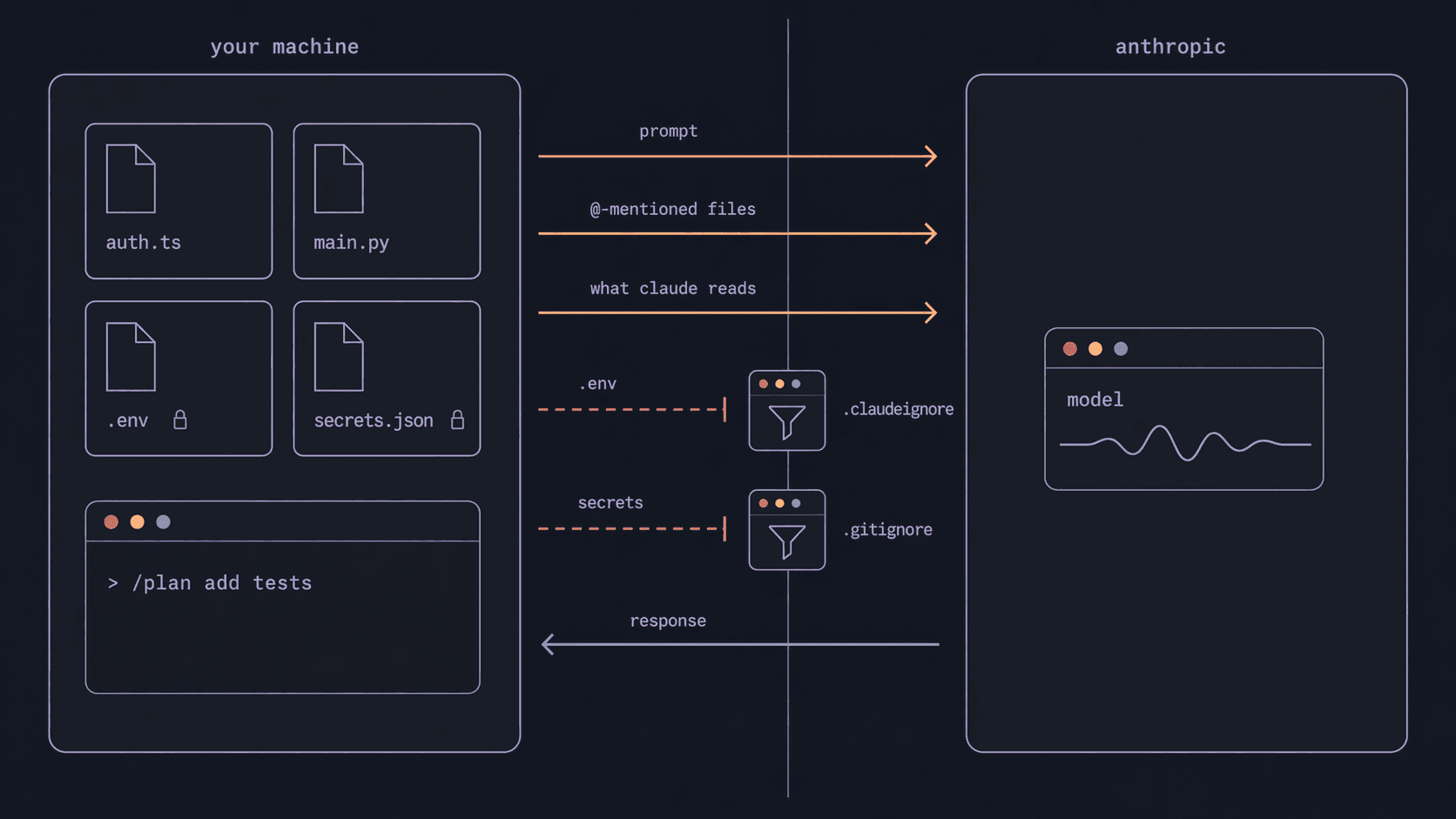
What leaves your machine
Every prompt sends: your message, files you explicitly share (via @, tool use, or what Claude reads to answer), and conversation history in the current context window.
It does not send: your full filesystem, files outside the project, anything matched by .gitignore or .claudeignore.
Plan tiers and retention
| Plan | Audience | Retention posture |
|---|---|---|
| Pro | Individual | Standard retention; used to improve service; opt out in console settings. |
| Max | Heavy individual | Same as Pro. |
| Team | Small orgs (5-200 seats) | Admin-configurable. Stricter defaults than Pro. |
| Enterprise | Large orgs | Zero-retention available. Admin pushes policy. SSO, SOC 2, DPA. |
| API direct | Developers, some features blocked | Retention policy set by you in API console; Remote Control, mobile app, and team features typically locked out. |
If your company has a Team or Enterprise seat, use it. The retention and admin-policy differences matter for corporate use.
Model enforcement. Managed settings add a second layer. Set enforceAvailableModels: true in your managed config and the availableModels allowlist also constrains the Default model — a Default that would resolve to a disallowed model falls back to the first allowed model, and users can't widen the list via their own project or user settings.
.claudeignore
The simplest defence regardless of plan. Next to .gitignore, lists files or paths Claude never sees:
.env
.env.*
**/secrets.*
customer-data/
proprietary-algorithms/
Use it for secrets, customer data, internal docs — whatever your compliance posture requires.
Sandboxing
/sandbox wraps bash commands in a filesystem + network sandbox enforced at the OS level (Seatbelt on macOS, bubblewrap on Linux/WSL2). Chapter 8 has the teaching. The flags that matter for managed deployments:
| Flag | Effect |
|---|---|
sandbox.failIfUnavailable: true | Hard-fail if sandbox can't start. No silent fallback. |
allowUnsandboxedCommands: false | Disables the escape hatch that re-runs commands outside the sandbox. |
sandbox.network.allowManagedDomainsOnly: true | Only admin-approved domains reach the network. |
sandbox.filesystem.allowWrite | Paths outside CWD where subprocesses may write. Merges across settings scopes. |
sandbox.credentials: false | Block sandboxed commands from reading credential files and secret environment variables. |
mode: "mask" (credential files) | Sandboxed commands read a sentinel copy of the file instead of the real value — the whole file, or just what an extract regex captures. The sandbox proxy substitutes the real value only on egress. Linux/WSL only; macOS falls back to deny. |
decode: "jwt" + maskClaims | JWT-aware masking — masks specific claims inside a token instead of the whole credential file. AWS deployments also get awsPairs/sigv4 re-signing. Needs network.tlsTerminate; honored only from user, managed, or --settings settings. |
MCP security
MCPs that fetch untrusted content (web pages, issues, emails) can inject instructions into your session. Anthropic's stance: third-party MCPs at your own risk. Review what an MCP does before installing. Prefer first-party MCPs from anthropics/ organisations when available.
Canonical references
- Anthropic Privacy Policy ↗
- Anthropic Trust Center ↗ — compliance certifications, data processing addendum, security posture
- Claude Code data handling ↗
- Enterprise plan features ↗
- Permissions docs ↗
If you're unsure what your organisation's policy allows, talk to your admin before touching production code with Claude.
8.6 Extending Claude
Skills
The Agent Skills open format — spec and reference implementations:
- agentskills.io ↗ — the open standard
- github.com/anthropics/skills ↗ — 17 official skills + the
skill-creatorandmcp-buildermeta-skills - Skills docs ↗
Chapter 7 shows the agentic skill-authoring workflow (invoke skill-creator or craft-skill, answer discovery questions, review the draft).
Plugins
Plugin manifest format, marketplace submission, plugin-vs-skill distinction:
- Plugins docs ↗
- Plugins reference ↗
- Submit a plugin: claude.ai/settings/plugins/submit ↗
Hooks
Shell commands, HTTP endpoints, or LLM prompts fired at specific lifecycle events. Events include SessionStart, PreToolUse, PostToolUse, FileChanged, Stop, PreCompact, MessageDisplay (transform or hide assistant message text as it is displayed), and many more.
- Hooks docs ↗
- Configure in
.claude/settings.jsonunder"hooks", or in a plugin'shooks/hooks.json - Hooks receive the session's active effort level as
effort.levelin the JSON input and as$CLAUDE_EFFORTin the environment — handy for hooks that should behave differently depending on current effort
MCPs
Build custom MCP servers with the MCP SDK (Python or TypeScript):
- Model Context Protocol ↗ — the open standard
mcp-builderskill inanthropics/skillsscaffolds one- Claude Code MCP docs ↗
8.7 Canonical sources
Every official link referenced across this guide, in one place.
Anthropic — Claude Code
- Overview ↗
- Memory / CLAUDE.md ↗
- Skills ↗
- Plugins ↗
- Sub-agents ↗
- MCP ↗
- Hooks ↗
- Commands ↗
- Keybindings ↗
- Interactive mode ↗
- Remote Control ↗
- Claude Code on the Web ↗
- GitHub Actions ↗
- Settings (permissions) ↗
- Claude Code best practices ↗
- Deep links ↗
- Workflows ↗
- LLM gateway ↗
- Claude security ↗
Standards + reference repos
Ecosystem
- Compound Engineering plugin ↗
- Super Powers plugin ↗
- Heart of Gold toolkit ↗
- altk-evolve ↗ — IBM Research. Cross-session learning for coding agents via MCP + vector store.
Privacy + compliance
This lab
- github.com/ondrej-svec/claude-code-lab ↗ — source, issues, stars welcome.