Chapter 8 · Beyond the lab · 6 min read
On this page28
Where to go next
You have the basics. The rest is menu, not required. Pick one thing at a time, try it, leave the others for later.
Testing, properly
Three practices worth using, from people who've argued about them in public.
Tracer bullets — one test before the feature
Before you build anything, write one end-to-end test that fails because the feature doesn't exist. Prove the wiring works — request reaches controller reaches service reaches database — then iterate toward green.
The name comes from Andy Hunt and Dave Thomas in The Pragmatic Programmer. You fire a few rounds, see where they land, adjust. Their Artima interview on tracer bullets ↗ explains the metaphor and the discipline it imposes.
Write a failing end-to-end test for a POST /api/items endpoint that creates an item and returns 201. I haven't built the endpoint yet — just get the test to fail on the right line.
Build until it passes. You never forget the integration this time.
TDD — red, green, refactor
Test first, implementation second, refactor third. Three separate prompts, three separate diffs.
Kent Beck named the practice in Test-Driven Development: By Example. TDD has had its doubters. The 2014 Is TDD Dead? ↗ series between Beck, Martin Fowler, and DHH is still the best map of where it helps, where it hurts, and what "TDD" even means. Read it once, then decide your own posture.
Write a failing test for slugify(input: string) handling diacritics and consecutive spaces. Use our existing test setup.
Then:
Make the test pass. Minimal implementation only.
Then:
Refactor. Keep the tests green. Look for duplication or unclear naming.
Three diffs, three reviews, three correct things.
TDD is where agents earn their keep
Beck's recent take: TDD is a "superpower" for AI agents. The Pragmatic Engineer interview with Beck ↗ is worth the hour — Builder.io summarises the mechanism well: "everything that makes TDD a slog for humans makes it the perfect workflow for an AI agent ↗." Write tests, give them to the agent, let it iterate to green without the ego cost humans feel when their code keeps bouncing off a red bar.
The counterpoint, same interview: agents sometimes delete the tests to make them pass. Watch the diff. Pin the test files in your review.
Mutation testing — check the tests themselves
Every project eventually asks: is my test suite actually protecting me? Mutation testing answers it. The tool makes small changes to your code — flips a comparison, drops a return — and runs your tests. If the tests still pass, they weren't testing what you thought.
Worth knowing about. Not worth insisting on until you have a real suite to mutate.
Agent-driven review
Agents don't mind reading your code. They can run it on every PR, on every commit, before every merge. Five worth knowing about:
Claude Code /code-review
Ships with Claude Code. Run /code-review on any diff to surface correctness bugs — logic errors, edge cases, missing branches. Pass an effort level (/code-review high) to go deeper. Pass --comment and findings post as inline GitHub PR comments. Pass --fix and Claude applies the findings directly to your working tree — reuse, simplification, and efficiency improvements included. /simplify is now an alias for /code-review --fix.
Different job from /security-review: code-review targets correctness; security-review targets vulnerabilities. Run both on a PR that matters.
Claude Code /security-review
Ships with Claude Code. Scans the pending diff for SQL injection, XSS, auth flaws, insecure data handling, dependency issues — with severity ratings and false-positive filtering. Customise by copying security-review.md into .claude/commands/. Source: anthropics/claude-code-security-review ↗.
In CI the same engine runs as a GitHub Action via anthropics/claude-code-action ↗ — catches issues before a human reviewer even clicks the PR.
GitHub Copilot Autofix
Built into GitHub's code scanning. When CodeQL flags an alert, an LLM proposes a fix inline on the PR — you accept, edit, or reject. Free on public repos, included with Code Security on private ones. Supports C#, C/C++, Go, Java/Kotlin, Swift, JS/TS, Python, Ruby, Rust. Copilot Autofix docs ↗.
Semgrep Assistant + MCP
Semgrep ↗ is a fast static analyser. Its MCP server ↗ wires the scanner into Claude Code and other agents: the agent runs a scan, reads the finding, proposes a fix, re-runs — a closed loop. Good fit if your CI already uses Semgrep rulesets.
Snyk DeepCode AI
Snyk DeepCode AI ↗ combines a symbolic taint-analysis engine with a neural model trained on millions of lines. The symbolic side constrains what the LLM can suggest — small targeted fixes, not rewrites. Worth evaluating on a codebase that already lives in Snyk.
Amazon Q Developer code reviews
Q Developer ↗ reviews codebases for security and quality — SAST, SCA, AWS best practices — and auto-fixes what it can. Best fit if you're already on AWS and want findings surfaced next to your other Q workflows.
Pick one that matches where your code lives. Running two is fine; running five is noise.
LLMs for security — current tooling
Two tools worth naming, both landscape-shaping, both with access hedges.
AWS Security Agent
AWS Security Agent ↗ went GA at the end of March 2026. Autonomous penetration testing, 24/7, $50 per task-hour — roughly $1,200 per full app test. Different class of tool from Q Developer's code reviews: Q flags issues in your source; Security Agent tries to break your running app the way a human pentester would.
The clean pitch: you can run a pentest per release instead of per year.
GPT-5.4-Cyber
OpenAI's cybersecurity-tuned GPT-5.4 variant ↗ has fewer refusal restrictions on legitimate security work — vulnerability research, binary reverse engineering, malware analysis. Access is gated. You apply through OpenAI's Trusted Access for Cyber program and get verified before the model is enabled for you. Enterprises apply via their account rep; individuals at chatgpt.com/cyber.
Worth naming because you'll hear about it. Not worth waiting for — for day-to-day defensive work on application code, the tools above cover most of what a working team needs.
Where to start, if you're starting now
/security-review on every commit. claude-code-action on every PR. One dedicated tool (Semgrep, Snyk, or Q Developer) in CI for the SAST layer. Add AWS Security Agent when you have something shipped worth attacking. Skip GPT-5.4-Cyber until you have a concrete defensive use case that justifies the gates.
Security concerns that don't go away
Tools help. They don't erase the shape of the problem.
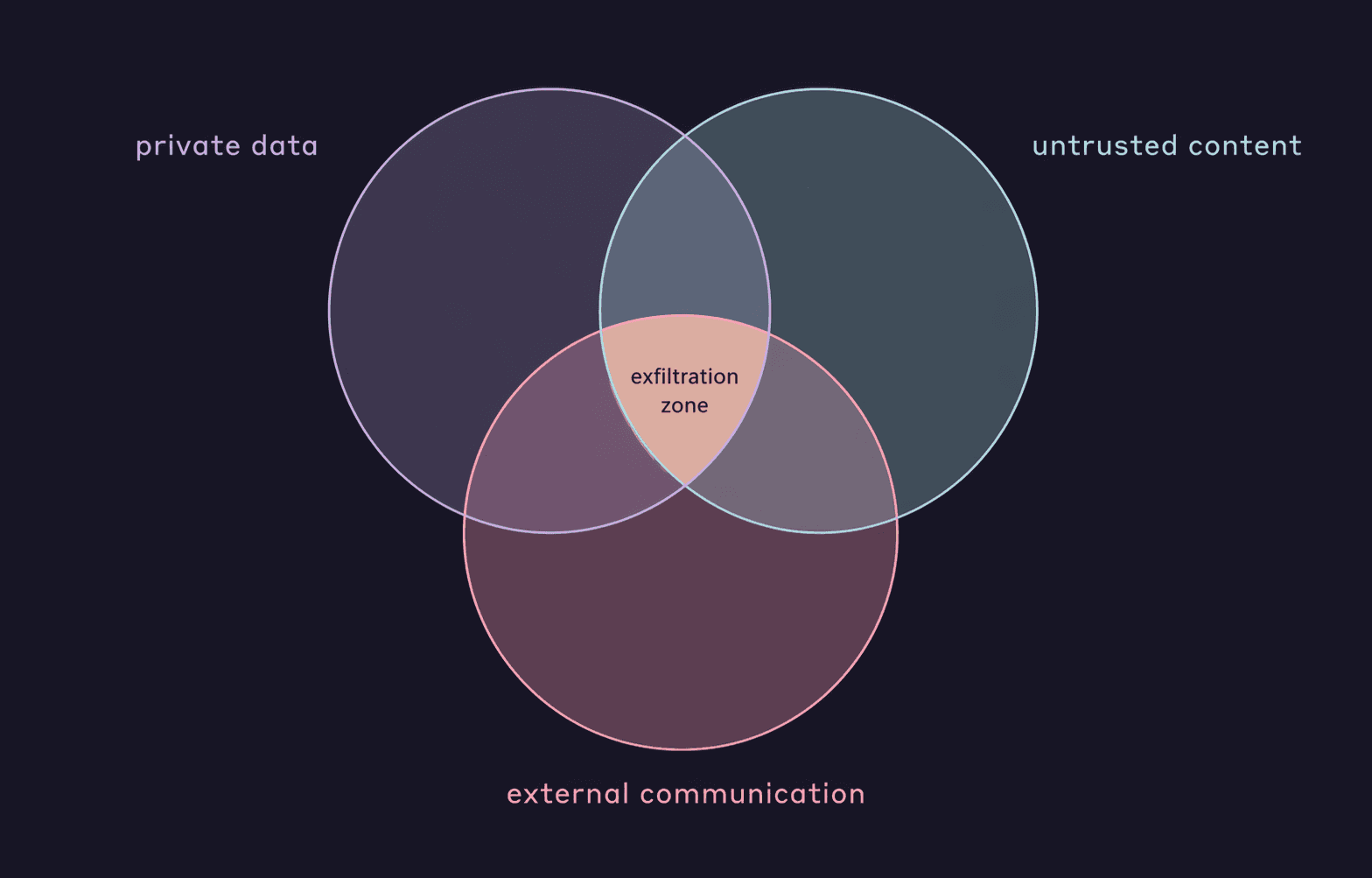
Simon Willison named the lethal trifecta ↗ — three conditions that, combined, let an attacker exfiltrate your data through an agent:
- Access to private data — your repo, your tokens, your customer records.
- Exposure to untrusted content — a GitHub issue, a scraped page, an email, an MCP tool output.
- External communication — any channel the agent can reach out on.
If all three are live, an attacker who can inject instructions into the untrusted content can usually get it to send the private data out.
Korny Sietsma's Agentic AI and Security ↗ on martinfowler.com extends the framing into practical mitigations: break tasks so each sub-task removes at least one leg of the trifecta; run LLMs in sandboxed containers; take small, human-reviewable steps.
Practical posture:
- Audit every MCP you add for the trifecta. Most third-party MCPs fetch untrusted content.
- Keep test files out of "agent edits freely" scope — the agents-delete-tests counterpoint from Beck is real.
- Review diffs on anything touching auth, secrets, or migrations.
The agent is fast. Humans stay on the boundary.
Sandboxing
/sandbox is how you make that boundary concrete. It wraps every bash command Claude runs — and every subprocess those commands spawn (npm install, kubectl, terraform, whatever) — in an OS-level isolation layer. Filesystem access is locked to the working directory by default. Network traffic goes through a proxy that only reaches approved domains.
Direct mitigation for the trifecta. Sandbox removes the external communication leg by default. If an attacker injects instructions via an MCP or a scraped page, the outbound request to evil.com dies at the proxy. You shrink the blast radius without relying on Claude to catch the injection itself.
Type /sandbox in a session and pick a mode:
- Auto-allow — sandboxed commands skip permission prompts. Anthropic's internal data shows 84% fewer prompts.
- Regular permissions — same isolation, standard prompt flow.
Sandboxing is orthogonal to Ch 4's permission modes. Auto-allow sandbox can run while you're still in "Ask permissions" — bash commands inside the bounds execute without asking, while file edits still prompt.
Platform support. macOS works out of the box via Seatbelt. Linux and WSL2 need sudo apt install bubblewrap socat first. WSL1 and native Windows aren't supported yet.
For corporate deployments, the flags that matter belong in managed settings:
sandbox.failIfUnavailable: true— Claude Code refuses to run if the sandbox can't start. No silent fallback.allowUnsandboxedCommands: false— disables the escape hatch that lets Claude re-run a failing command unsandboxed.sandbox.network.allowManagedDomainsOnly: true— only admin-approved domains reach the network; users can extend the path allowlist but can't remove admin restrictions.sandbox.network.strictAllowlist: true— denies non-allowlisted hosts for sandboxed commands without prompting.
Together these turn sandboxing from a nice default into a security gate.
What it doesn't cover. Only bash subprocesses. Read, Edit, Write, WebFetch go through the permission system, not the sandbox. Computer use runs on your real desktop. Domain-level filtering isn't packet inspection — allowing github.com broadly still permits exfiltration through gists and issues. Defense in depth, not a total solution.
Automation
Hooks
Run scripts automatically before or after Claude events. Auto-format on save, block commits to main, notify Slack when a long task finishes. Configured in settings.json or a plugin's hooks/hooks.json.
Try this first: add a PostToolUse hook that runs your linter after every edit. One line of config, one less manual step.
→ Hooks docs ↗ · chapter 9.7 for the event catalog
Claude in CI
Run Claude in GitHub Actions via anthropics/claude-code-action@v1. @claude mentions in issues or PRs trigger it; cron or events work too. Auto-review PRs, triage issues, generate changelogs, open follow-up PRs.
Try this first: in any repo, /install-github-app in Claude Code walks through setup. Then comment @claude add a README section about environment variables on any open issue.
→ Claude Code GitHub Actions ↗
Loops and scheduled runs
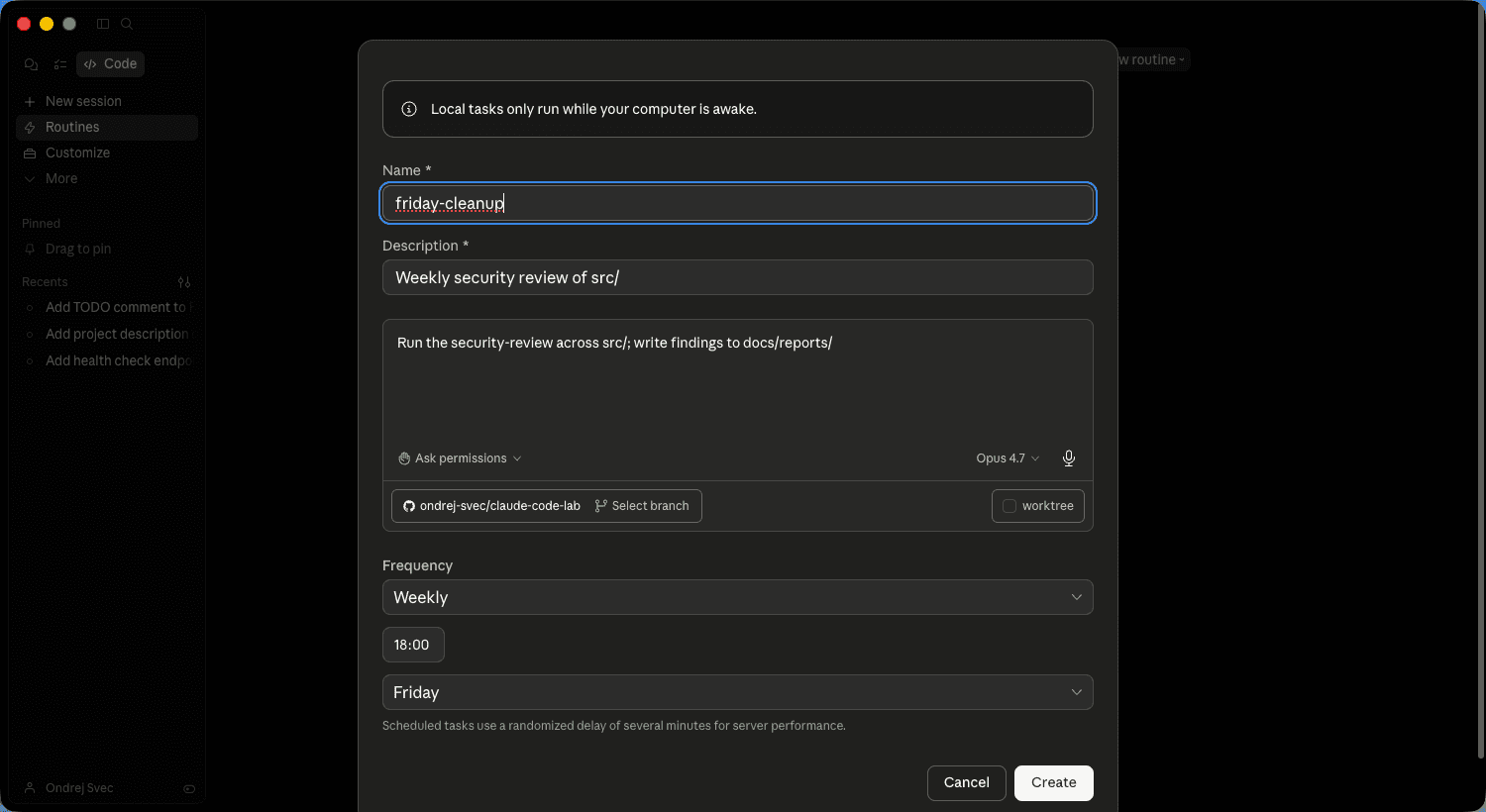
A long-running task can fire every N minutes or on a schedule. "Every morning, check main for failing tests and open a fix PR." "Every evening, summarise what merged and post to Slack."
/loop runs a command on a recurring interval. /schedule (in the Heart of Gold toolkit) creates a cron-scheduled remote agent. Shadow tasks do their work in the background without disrupting your current conversation.
Try this first: /loop 5m check if any tests are failing and report. Leave it running while you do other work.
Agents that learn across sessions
Claude Code resets between conversations. CLAUDE.md helps; /compound in the Compound Engineering loop helps more. But both require you to remember to write things down.
altk-evolve ↗ (IBM Research, Apache 2.0) automates the memory step. An MCP server captures trajectories — what worked, what didn't — into a vector store, then injects the relevant lessons into new sessions. Reported +8.9 points on the AppWorld benchmark, +74% on hard multi-step tasks. Drops into Claude Code, Codex, or Bob.
Try this when: you've done Compound Engineering for a month and still feel like you're repeating the same fixes across projects. That's the problem altk-evolve is designed for.
People to follow
The field moves fast. Five voices worth keeping an eye on for the long game.
- Simon Willison ↗ — the most reliable signal on LLM capabilities, agent security, and where the hype breaks. Named "prompt injection" and the "lethal trifecta." Honest hedges, small working examples. Read the blog.
- Korny Sietsma ↗ — agentic-AI security from an agile-engineering lens. His Agentic AI and Security ↗ on martinfowler.com is the clearest current primer on the attack surface.
- Tanya Janca ↗ (SheHacksPurple) — author of Alice and Bob Learn Application Security and Alice and Bob Learn Secure Coding. Trains developers, not security teams. If your reflex is "security is someone else's job," this is the reset.
- Daniel Miessler ↗ — weekly Unsupervised Learning ↗ newsletter covers AI, security, and their intersection. Good for spotting trends before they land in your inbox as a mandate.
- Laurie Williams ↗ — NC State, research on secure software supply chains and DevSecOps practices backed by the NSF. Academic rigour, practitioner audience. Follow her publications when a topic (SBOMs, dependency attacks, pair programming) moves you to dig deeper.
Five names, five URLs. An hour a week across them is enough to stay oriented.
Run /powerup — the built-in tour
Anthropic shipped interactive onboarding in Claude Code in April 2026. Type /powerup and you get ten 3-to-10-minute animated walkthroughs of the features most people miss: @-file mentions, plan and auto modes, rewind, background tasks, CLAUDE.md, MCPs, skills + hooks, subagents, remote control, and model effort dials.
Nine of the ten overlap with chapters you just read — /powerup is the animated companion to this guide. The one genuinely new capability it demonstrates that this lab doesn't is /tasks for backgrounded work — kick off a long-running operation, keep working, pick up the result later.
Worth an evening. The progress counter ("0/10 unlocked") resets between sessions, so finish a power-up before you close the terminal if you want it to count.
This lab is on GitHub
This whole guide — website, chapters, samples, companion skill — is open source at github.com/ondrej-svec/claude-code-lab ↗. If something was wrong, if the Czech is off, if you have a pattern worth adding: open an issue or a PR. Star it if it helped — that's the signal to keep improving it.
Practice: continue your sample
Working through the lab in order? Take what this chapter taught to the sample you started in chapter 2 — or to a codebase of your own, where it'll land harder.
- Run
/security-reviewin your project folder. Read the findings — don't treat them as pass/fail, treat them as a map of what a reviewer would flag. On the samples, expect a small set. On your own repo, the list is longer and more interesting. - Add a tracer-bullet test for the endpoint you wrote in chapter 2. Prompt: "Write a failing end-to-end test for
GET /healththat asserts 200 and{ ok: true }." Let the test fail first, then flip it to passing. You now have a real test for a real route. - Optional: fork the repo (or install in your own) and wire
anthropics/claude-code-action@v1on the default branch. Tag@claudeon your next PR and watch it auto-review against yourCLAUDE.md.
When it works: your sample has a security scan you actually read, a tracer-bullet test that passes, and optionally a Claude reviewer watching every PR. That's the harness posture in practice — verification without eyes on every diff. Take the same moves to a real project tomorrow.
Last word
Nothing here is required. Treat this chapter as a save point. Come back when you've felt the limits of what you know, pick one thing to try.
Good luck. Have fun. Build something that compounds.