Chapter 4 · Craft · 7 min read
On this page9
Iteration and control
The first prompt is never the last prompt. The value in Claude Code isn't the output — it's the loop that gets you to the right output in three or four rounds instead of one frustrated rewrite.
Over time the goal shifts. Early on you read every diff, watch every change, stay in control. Later you build a harness around the agent so the work becomes verifiable without your eyes on every line. This chapter is both halves — the daily iteration habits, and the posture that makes them scale.
Rewind
Double-tap Esc in the Claude window. You're back one message. File changes are rolled back. The conversation branches. Same effect as /rewind, just faster.
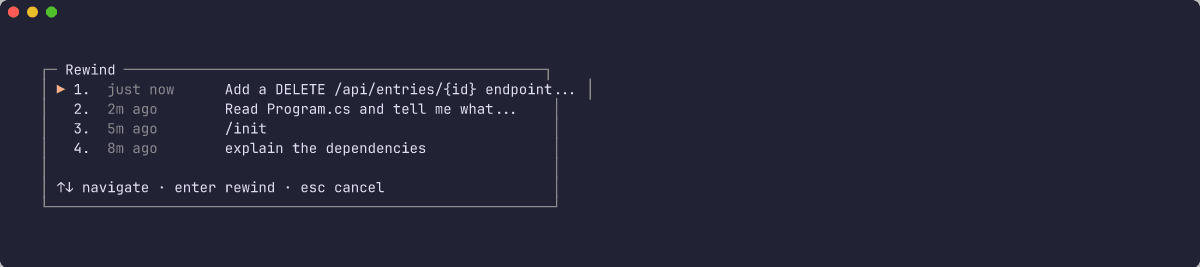
This is the single most useful keyboard shortcut in the whole tool. Use it whenever:
- Claude went down the wrong path and you want to retry the prompt
- You spotted a better way to phrase the ask mid-thought
- You want to branch an experiment without committing to it
- The diff surprised you and you'd rather not have it
Rewind is cheap. Re-prompting from scratch is expensive.
The rewind menu now has Summarize up to here — compresses earlier context while keeping recent turns intact. Reach for it when you want to free up context at a specific point in the conversation without starting over.
/rewind also spans /clear boundaries — the checkpoint menu shows sessions you've cleared too. Branch from before a clear the same way you branch from the last prompt.
Narrow the scope
The fastest way to bad output is a prompt that asks for too much at once.
Wide:
Refactor this file to use dependency injection, add tests, and migrate it to TypeScript strict mode.
Narrow, three prompts:
Refactor this file to use dependency injection. Don't touch tests or types yet.
Now add tests for the refactored interface.
Now enable strict mode and fix what breaks.
Three narrow prompts land three times faster than one wide one. Each one gets a clean review.
"That's not quite right"
When Claude does something close but off, resist the urge to rewrite from scratch. Describe the gap:
The helper function is fine, but move it into
utils/time.ts— we keep time-related helpers there.
Claude will move it. The structure holds. You didn't have to re-explain the whole task.
Managing context — /clear vs /compact
Context windows are large but not infinite. Two commands, different tools:
/compact [focus]— same conversation, Claude summarises the history so far and throws the raw turns away. Use when you're mid-task and need breathing room./clear— new conversation, old one archived (resumable via/resumeor/rewind). Use when you've pivoted to a different area of the codebase, or the conversation has 30+ turns and is drifting.
A clean conversation with good CLAUDE.md is almost always faster than a long one.
Pro move for the Compound Engineering loop (chapter 7): clear between phases. /clear before /plan means the brainstorming turns don't muddy the plan. /clear before /work means the plan debate doesn't colour the implementation. Each phase gets sharp context; /compound at the end has clean material to summarise.
The shift: from control to a harness you trust
Early in agentic work, the advice is simple: read every diff, review every change, don't trust the agent. That's the control reflex. It builds the skill.
As you work with Claude Code daily, that posture becomes the bottleneck. You can't read fifty diffs an hour. You can't simultaneously hold the plan + the diff + the codebase in your head. The longer you sit in control mode, the less the agent can actually accelerate you.
The better path: build a harness around Claude Code that makes its work verifiable without your eyes on every line. Your role shifts from reviewer to harness architect.
What the harness looks like in practice: testing discipline (tracer bullets, TDD, mutation checks), agent-driven review (/security-review, claude-code-action, Semgrep or Snyk in CI), security posture against the lethal trifecta, and automation (hooks, Playwright, benchmark assertions). Chapter 8 is the depth source — pick one, read the references, try it on a real task.
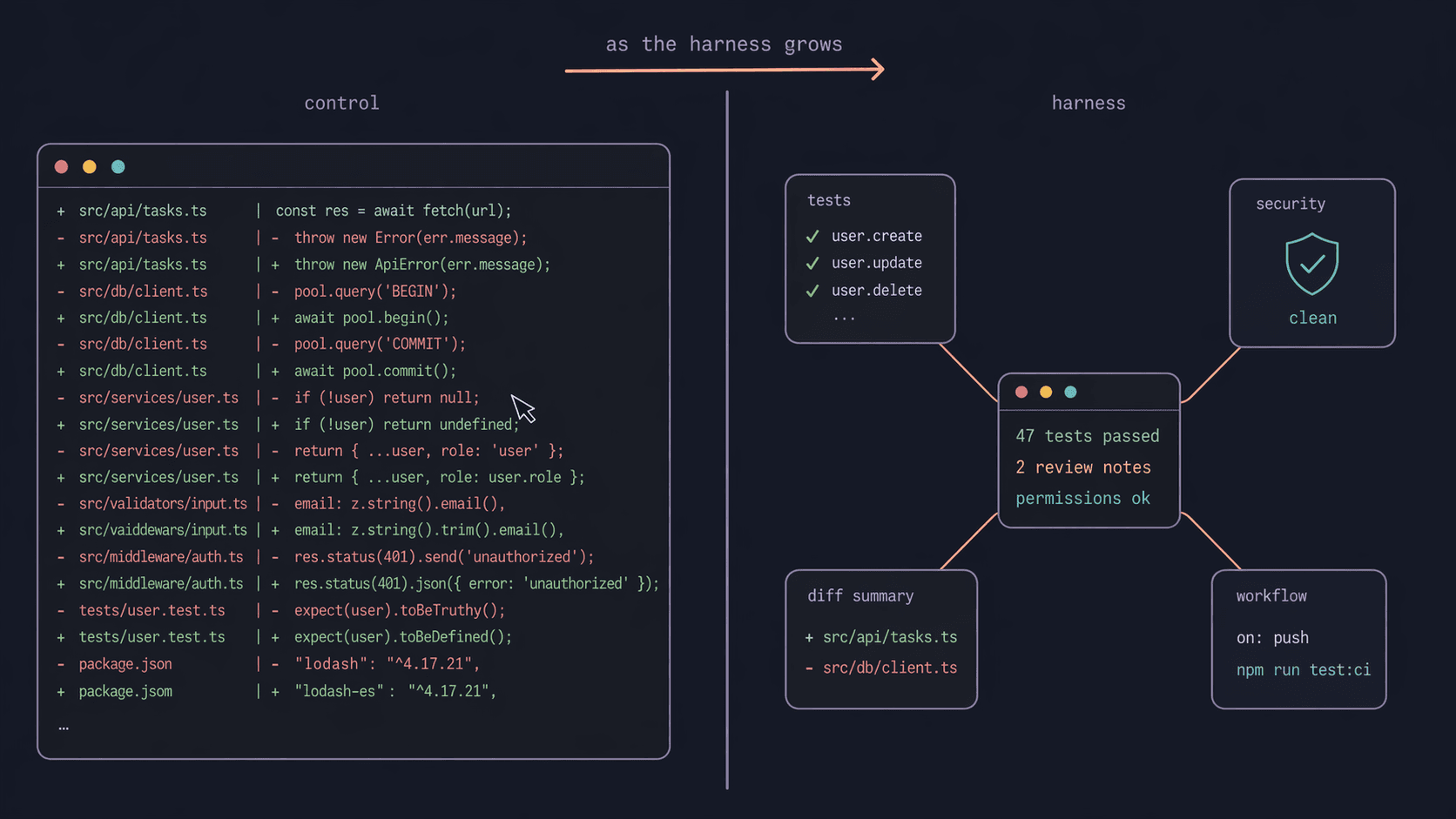
With the harness in place, the question changes from "did Claude make a mistake in this diff?" to "did the harness catch it if it did?" Diff review becomes a spot-check, not a mandate. You get faster. The agent gets trusted. Both grow together.
If you're just starting: read diffs carefully and build the reflexes. As the harness grows around you, read fewer of them. That progression is the point.
Permission modes
Claude Code has five permission modes. The active one controls what Claude can do without asking.
- Manual — Claude asks before each edit or tool run. Default. Across the CLI,
--help, VS Code, and JetBrains this mode is now labeled Manual (--permission-mode manual/"defaultMode": "manual"— the olddefaultvalue still works). A grey ⏸ badge in the footer shows when you're in it.AskUserQuestiondialogs no longer auto-continue on their own — opt into an idle timeout via/config. - Accept edits — Claude edits freely, you review the diff afterward. Still prompts before writing build-tool config files that grant code execution (
.npmrc,.yarnrc*,bunfig.toml,.bazelrc,.pre-commit-config.yaml,.devcontainer/, etc.). - Plan mode — Claude can read, think, and propose, but cannot edit or run until you leave plan mode.
- Bypass permissions — Claude edits and runs without asking. Same state as launching with
--dangerously-skip-permissions. Must be enabled in the desktop app settings before it shows up in the menu. Bypass now extends to writes inside.claude/,.git/,.vscode/, and shell config files — paths that still prompted even in bypass mode. Catastrophic removal commands still prompt as a safety net. Use only in sandboxed environments. - Auto mode — a classifier-driven "go fast" mode that learns safe operations and asks only on the ambiguous ones. Now available on the Pro plan; the permission classifier defaults to Sonnet 5 for external sessions, pinned for the rest of the session. Prefer Auto over Bypass when you want speed — Auto keeps guardrails, Bypass removes them. Fine-tune the classifier with
settings.autoMode.hard_deny— rules there block unconditionally, regardless of user intent or anyallowexceptions.autoMode.classifyAllShell: trueroutes all Bash and PowerShell commands through the classifier — not just patterns flagged as arbitrary code execution. Denial reasons now appear in the transcript, the denial toast, and/permissions→ Recent denials, so you can see exactly what triggered each block and tune from there. Subagent spawns are now evaluated by the classifier before launch — a subagent can no longer request a blocked action without review. Messages sent to other agent sessions viaSendMessagego through the same classifier check before they dispatch. Auto mode doesn't suppressAskUserQuestionwhen you or a skill explicitly relies on it. Destructive git commands (git reset --hard,git checkout -- .,git clean -fd,git stash drop) are now blocked when you didn't ask to discard local work.git commit --amendis blocked when the commit wasn't made by the agent this session.terraform destroy,pulumi destroy, andcdk destroyare blocked unless you asked for the specific stack. The dangerous-rm, background-&, and suspicious-Windows-path checks no longer open a permission dialog on their own — the classifier adjudicates them instead. In plan mode with auto, Bash commands the static analyzer can't prove read-only now go through that same classifier rather than triggering a prompt — the classifier only decides whether the command is permitted; execution still waits until you leave plan mode.
Fine-grained permission rules. settings.json allow/deny entries accept Tool(param:value) syntax — matches on a tool's actual input parameters (wildcard * works). Example: Agent(model:opus) in a deny rule blocks Opus subagent spawns while leaving other Agent calls through. Right for auto mode setups where you want speed but not Opus on every subagent.
Permission rule syntax. The permission system accepts Tool(param:value) rules that match on a tool's input parameters — with * as wildcard. Agent(model:opus) in disallowedTools, for example, blocks any subagent from launching with Opus.
How to switch:
- Desktop app: press
M, then a number1–5. Modes that need settings enablement appear dimmed until turned on. - CLI:
Shift+Tabcycles through available modes. You can also start in a specific mode with--permission-mode <mode>(e.g.--permission-mode auto).
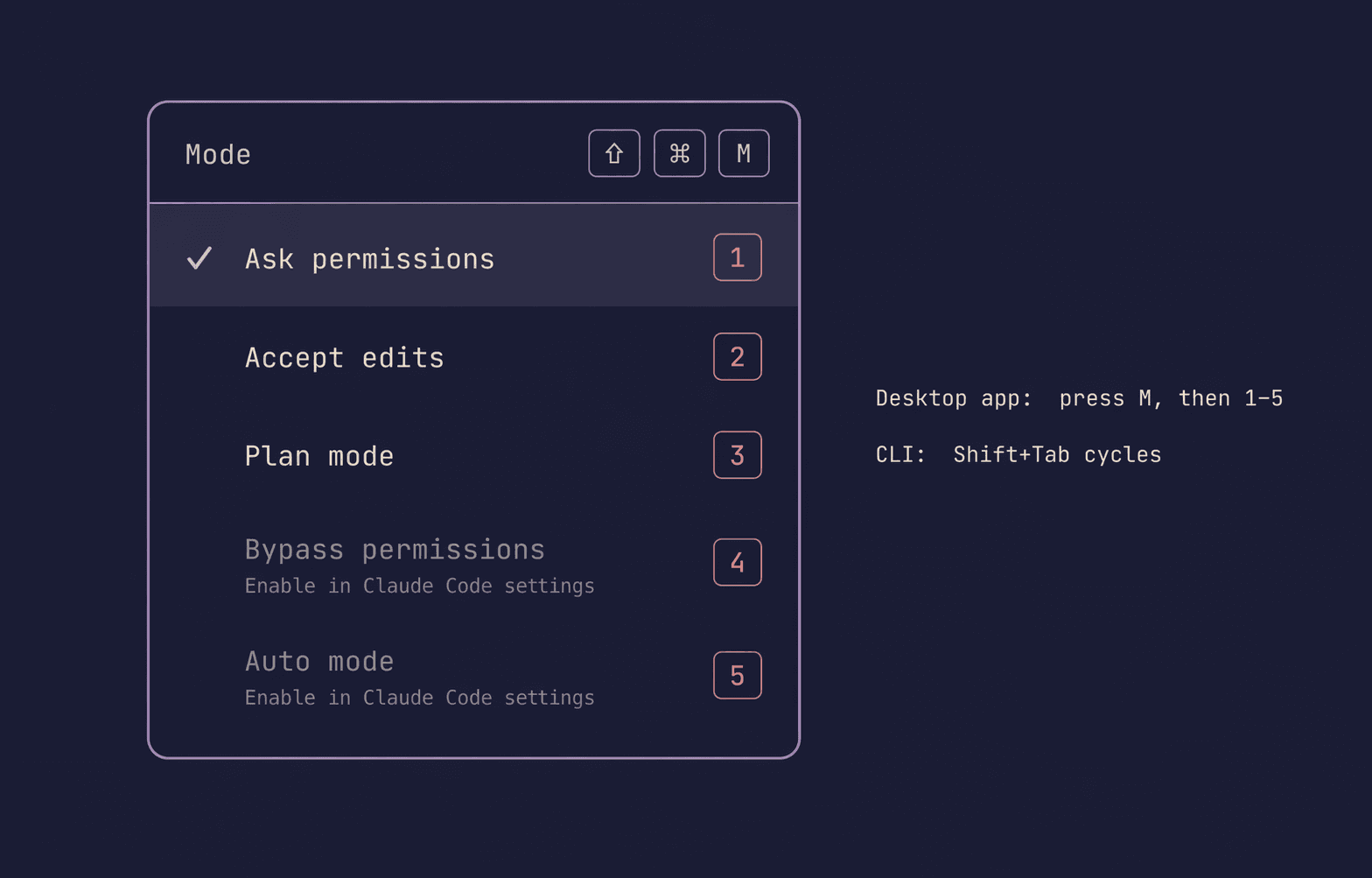
Plan mode is the one most worth knowing day-to-day. It lets Claude think as hard as it wants without doing anything destructive — you see the reasoning, accept or redirect, then leave plan mode to let it execute. Auto mode is the one most worth learning to trust, once your repo has the tests and harnesses to catch mistakes. Bypass is for sandboxes — don't make it a habit.
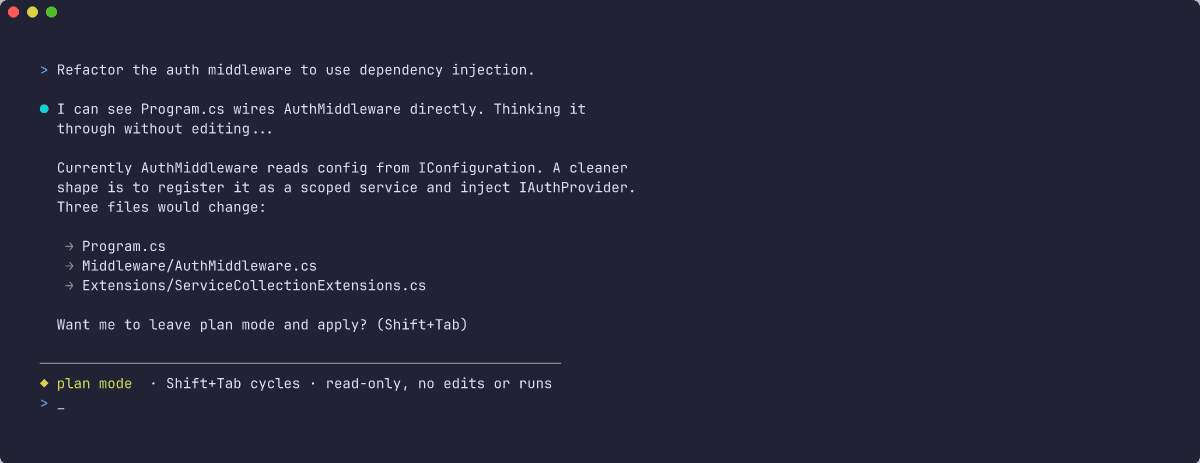
Plan mode doesn't persist the plan. The plan lives in the conversation and disappears with /clear. If you want plans written to disk — so you can review them later, share them with a teammate, or have /work act on them — that's what Compound Engineering's /plan skill does (chapter 7). That's the recommended flow once you have real multi-step work.
When plan mode is worth it:
- Multi-file changes where you want to see the shape before commits happen
- Anything with a destructive step (migrations, deletes, rewrites)
- Tasks where the "what" matters as much as the "how"
When it's not:
- Single-line fixes
- One-function refactors
- Quick questions
One more dimension worth knowing: /sandbox. It's a separate toggle from these five modes — it wraps every bash command Claude runs in an OS-level filesystem and network sandbox, so even "accept edits" or "auto" can't reach outside the project or hit unapproved domains. Chapter 8 covers the details and the corporate-deployment flags.
Troubleshooting with --safe-mode. If Claude's behaviour surprises you — a hook misfiring, an MCP server interfering, a skill overriding something — start a session with --safe-mode or set CLAUDE_CODE_SAFE_MODE=1. It disables all customisations: CLAUDE.md files, plugins, skills, hooks, and MCP servers. If the problem goes away, it was configuration. Add one thing back at a time to find the culprit.
Hooks: exec form and continued turns
Two hook additions worth building into your harness.
args: string[] (exec form) skips the shell entirely. The array goes straight to the process — path placeholders don't need quoting, no shell expansion surprises. Switch to exec form when a hook command has dynamic arguments a shell would mangle.
continueOnBlock: true on a PostToolUse hook changes what a rejection means. Normally blocking ends the turn. With continueOnBlock, the hook's rejection reason feeds back to Claude and the conversation keeps going. Claude sees what it violated and can adapt without you re-prompting. Useful for teaching hooks — ones that enforce conventions rather than just refuse.
terminalSequence in hook JSON output: hooks can emit desktop notifications, set the window title, or ring a bell by writing to this field — no controlling terminal required. Practical for PostToolUse hooks that notify you when a long build finishes and you've stepped away.
background_tasks and session_crons are now included in Stop and SubagentStop hook input — the active background tasks and scheduled crons at the moment the session stops. Useful for Stop hooks that need to decide whether to clean up or hand off before the session exits.
hookSpecificOutput.additionalContext returned by a Stop or SubagentStop hook feeds Claude feedback and keeps the turn going — without being flagged as a hook error. The hook can tell Claude what happened; Claude adapts and the conversation continues rather than halting.
Hyphenated hook matchers. Matchers for tools with hyphens in the identifier — e.g. code-reviewer or mcp__brave-search — now exact-match the tool name. Previously they substring-matched, so a matcher could accidentally fire on unrelated tools. If you want to catch all tools from a hyphenated MCP server, update the matcher to mcp__brave-search__.*.
DirectoryAdded. Fires after /add-dir — or the SDK's register_repo_root control request — registers a new working directory mid-session. Wire a hook here to re-scan the new directory's CLAUDE.md the moment it lands, instead of waiting for the next session.
The recommended flow, when you're ready
This chapter is the daily habits. Chapter 7 is the practice that bundles them into a repeatable loop: brainstorm → plan → work → review → compound. Install the Compound Engineering plugin when you're ready — it's the shortest path from "I iterate one prompt at a time" to "I have a practice that produces reliably good work."
Practice: continue your sample
Working through the lab in order? Take what this chapter taught to the sample you started in chapter 2 — or to a codebase of your own, where it'll land harder.
- In your project folder, ask Claude to add a second read-only endpoint — on the samples, something like
GET /versionreturning{ "version": "1.0.0" }. On your own repo, a small route with real data from your domain. Before running the prompt, hitShift+Tabuntil you're in plan mode — Claude will plan but not edit. - Read the plan. If the shape is wrong — too many files, wrong location, missed a convention — don't bother correcting mid-plan. Double-tap
Escto rewind, then re-prompt with a narrower description. Better plan beats corrected diff. - Leave plan mode (Shift+Tab again) and approve. Claude writes the code, shows the diff, you run and commit when it works.
When it works: your sample has two endpoints, and you've felt plan mode + rewind on a real task — the two moves you'll use most often in the rest of the lab. The next chapter's practice has you build a small skill that scaffolds routes like this.
Go deeper
Library entries that build on this chapter.