Library · 6 min
Goes deeper from The ecosystem
On this page8
Using /cc-lab-diagnose
The lab teaches patterns. The diagnostic asks how your setup measures against them.
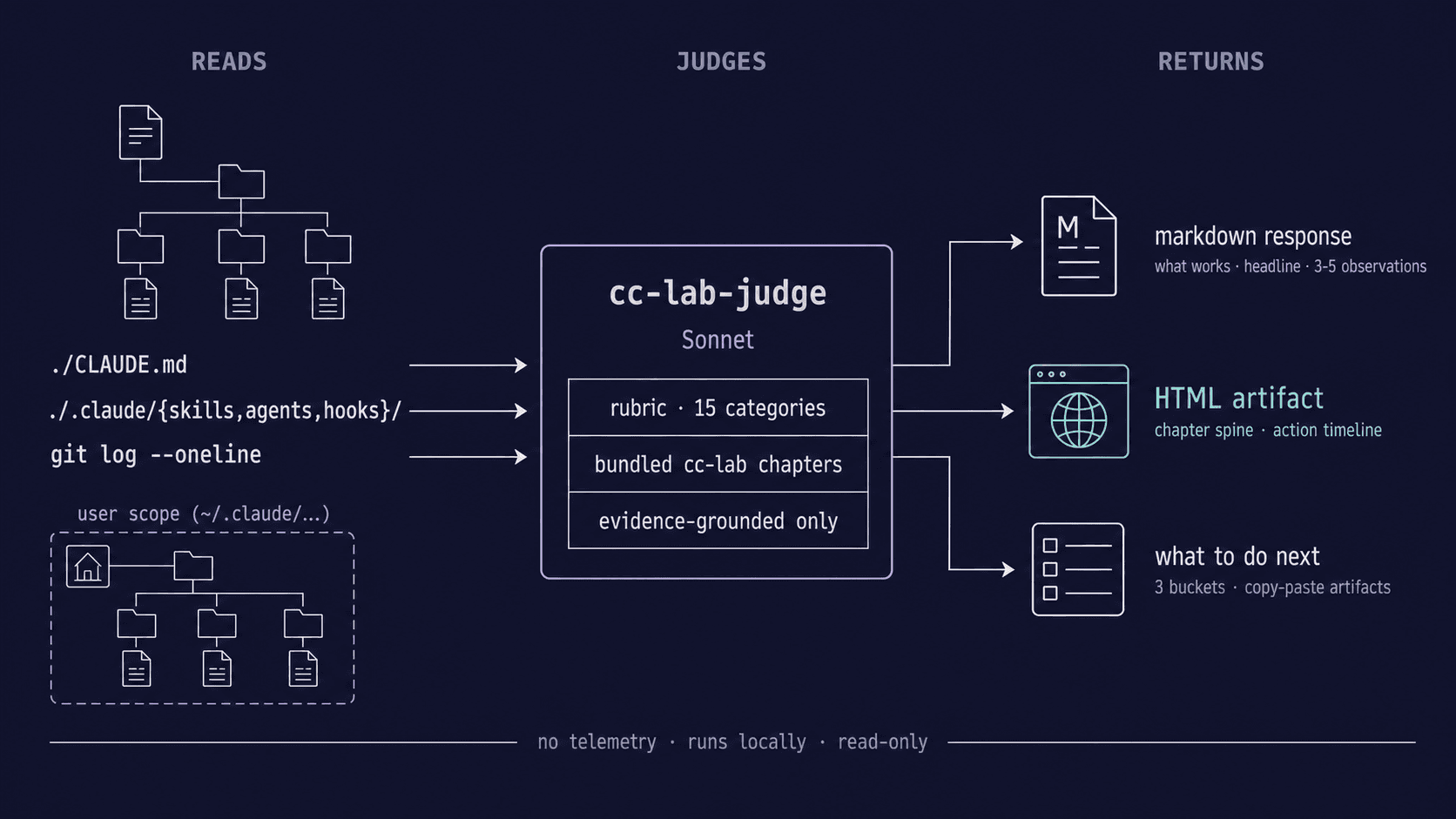
/cc-lab-diagnose reads your repo (or your personal Claude Code config, or both) and returns three to five evidence-grounded observations — each tied to a specific file, a specific quote, and a specific chapter you can read for the missing context. It's the closest thing to a peer review you can get without scheduling one.
Install
In any Claude Code session:
/plugin marketplace add ondrej-svec/claude-code-lab
/plugin install cc-lab@cc-lab
The first line registers this lab repo as a plugin marketplace. The second installs the cc-lab plugin from it. Cross-platform — works the same on macOS, Linux, and Windows. Update later with /plugin update cc-lab; remove with /plugin uninstall cc-lab.
What it does
Run it any of three ways. The skill resolves the mode first, before reading any files.
| Mode | Question it answers | Read scope |
|---|---|---|
| project | Would a teammate cloning this repo succeed today? | ./CLAUDE.md, ./.claude/, ./.mcp.json, git log |
| user | Is your personal harness pulling its weight? | ~/.claude/CLAUDE.md, ~/.claude/{skills,agents,commands,hooks}/, plugins, auto-memory |
| both | Both questions, two output sections | Project + user scopes |
Invoke explicitly:
/cc-lab-diagnose project
Or in natural language — "diagnose my setup", "audit this repo", "review my CLAUDE.md". If the mode is ambiguous, the skill asks before reading any files.
The diagnostic is read-only. It modifies nothing. It also does not score, grade, or rate — there's no maturity ladder, no zero-to-five metric. The output is observations, not a verdict.
What you get back
Each run produces three things:
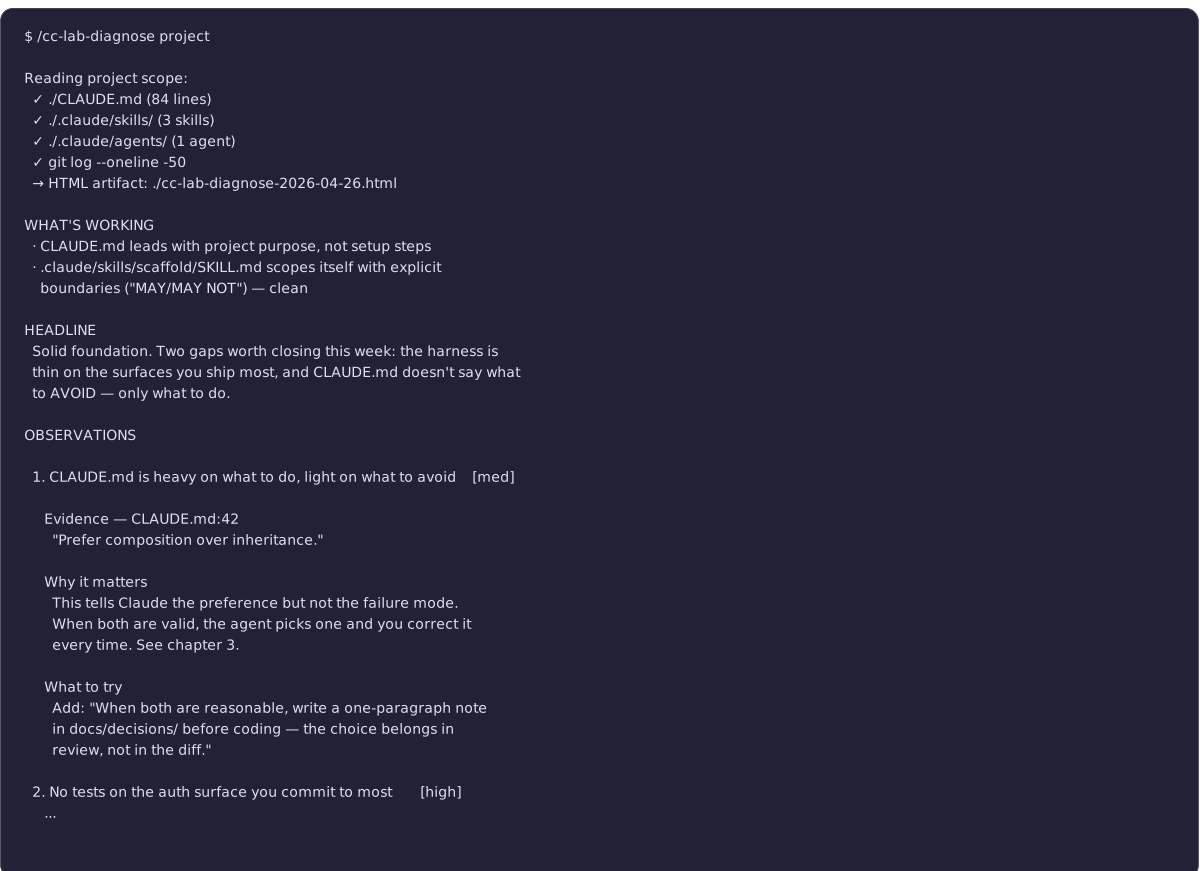
- A markdown response in the conversation — opening framing, "What's working" (one to three strengths), a headline (two to four sentences naming the most useful next moves), three to five observations with quoted evidence and chapter links, and a "What to do next" action plan.
- An HTML artifact saved to your current directory — the same diagnosis rendered as a self-contained page with a chapter spine visualization, an action timeline, severity-coded observation cards, copy buttons on every artifact, and a theme switcher. Open it directly in a browser; nothing external is required.
- A path to the HTML surfaced both at the top of the markdown and at the start of the action plan, so you can jump to the visualization without scrolling.
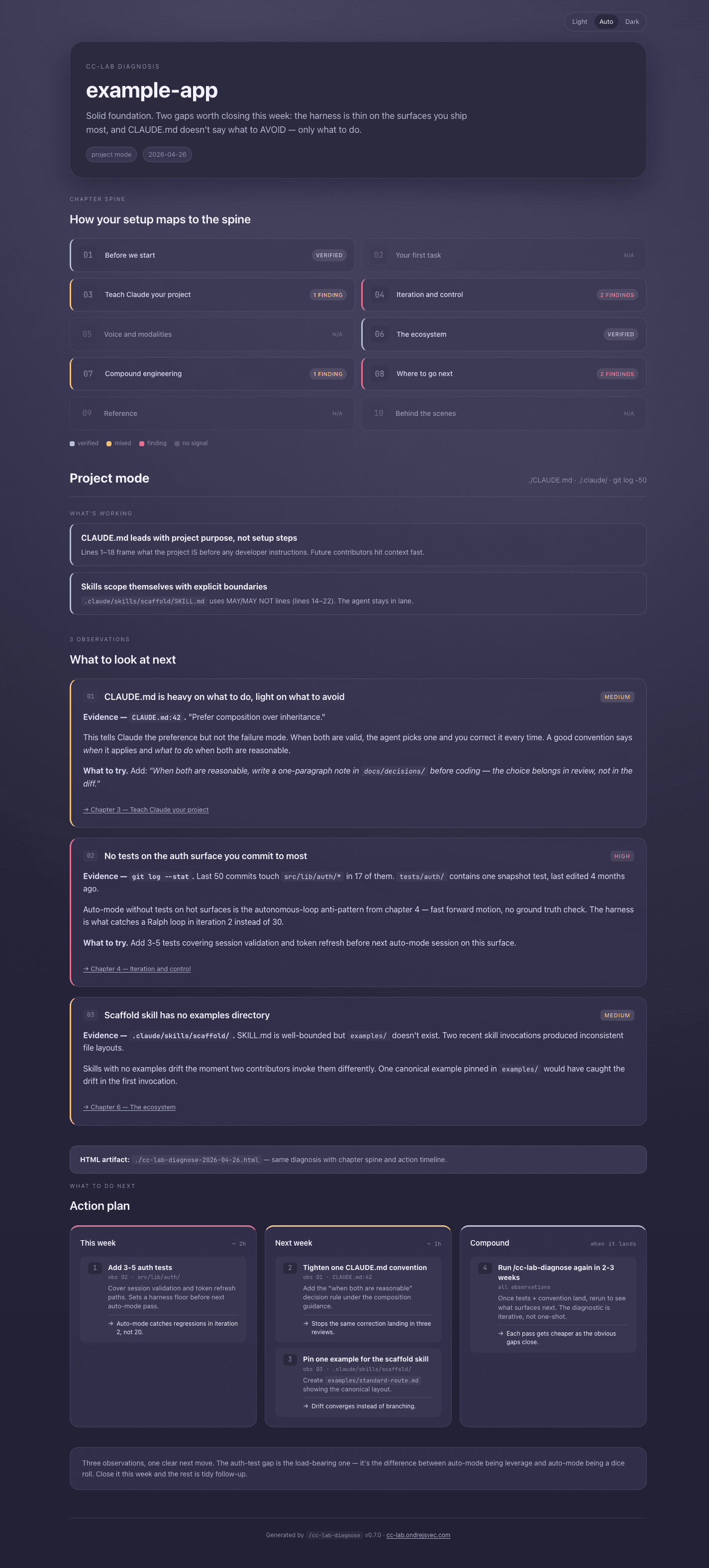
Every observation cites a specific file with a specific quote. If the diagnostic can't ground an observation in evidence, it doesn't make it.
How to interpret an observation
A typical observation has four parts:
- Title — the gap, named in plain language ("CLAUDE.md is heavy on what to do, light on what to avoid").
- Evidence — a direct quote from a file in your scope. The quote is the anchor; if you disagree with the observation, the quote is what you argue against.
- Why it matters — the practical consequence, framed against a specific chapter pattern.
- What to try — a copy-paste artifact (a
CLAUDE.mdsnippet, a permissions config, a hook script) and a chapter link that explains the pattern.
The shape is deliberately specific. A diagnostic that says "consider improving your context engineering" is checklist noise. A diagnostic that says "your CLAUDE.md line 42 says prefer composition over inheritance but doesn't tell Claude what to do when both are valid — here's a sentence that closes that gap" is something you can act on.
What the diagnostic is not
A few explicit non-goals worth naming:
- Not a checklist. No "you scored 7/10." Observations are individual; you decide which matter.
- Not a one-shot. The point is to come back when your setup evolves. A diagnostic from three months ago is stale; the lab pattern that landed last week isn't in it.
- Not telemetry. Nothing about your repo or config leaves your machine. The skill runs locally, the judge is your own Claude.
- Not a replacement for reading the chapters. Observations link to chapters; the chapters are where the practice lives. The diagnostic surfaces which chapter to read next — it doesn't substitute.
When to run it
Three high-value moments:
- First time setting up a repo for Claude Code — after writing your initial
CLAUDE.mdand a few skills, before you settle into the routine. Catches the gaps while editing is still cheap. - After a chapter you didn't fully apply — read chapter 4, realized your harness is thin, but didn't change anything. Run the diagnostic; it surfaces the specific places the chapter applies to your repo.
- When something's off but you can't name it — Claude is producing fine work but you sense the setup could be better. The diagnostic gives you specific words for what's vague.
It's also fine to run it just to see your work talked about specifically. That's part of what the lab is for.
Honest limits
Things the diagnostic gets wrong, and how to handle them:
- It assumes the lab's frame. If your project has good reasons for ignoring a pattern the chapters teach, the diagnostic may flag the absence as a gap. Read the observation, decide if the lab pattern actually applies, and disagree when warranted.
- It can't see private intent. Your
CLAUDE.mdmay be deliberately terse because the team hates verbose docs; the diagnostic might read that as "missing guidance." Evidence is the anchor — if the quoted line is doing what you want, the observation is wrong, not the file. - It's not a security audit. It cares about Claude Code patterns, not OWASP. Don't ship to production based on what it tells you about secrets handling — use a real security tool for that.
How this connects to the spine
Chapter 3 — Teach Claude your project is the chapter most directly tested by the project-mode pass; if your CLAUDE.md is thin, that's where the diagnostic will point.
Chapter 6 — Ecosystem covers skills and plugins generally, including how to install ones like this. The diagnostic is one example of the "tool installed via marketplace" shape.
Chapter 4 — Iteration and control and chapter 8 — Next steps are the chapters most often referenced in observations — iteration habits and harness building are where most setups have the biggest unrealized leverage.